Windows 8 的 SmartScreen 篩選器會將使用者下載的檔案資訊、安裝軟體資訊回傳微軟伺服器進行信譽比對,雖能提升安全性,但可能造成隱私外洩疑慮。本文教你透過「動作中心」暫時停用此功能。
操作步驟
- 按 Win + X 開啟快捷選單,點選 「控制台」。
- 依序點選 「系統和安全性」 → 「動作中心」。
- 左側點選 「變更 Windows SmartScreen 篩選器設定」。
- 在「Windows SmartScreen 如何處理未識別的應用程式?」視窗中,選擇 「不執行任何動作(關閉 Windows SmartScreen 篩選器)」。
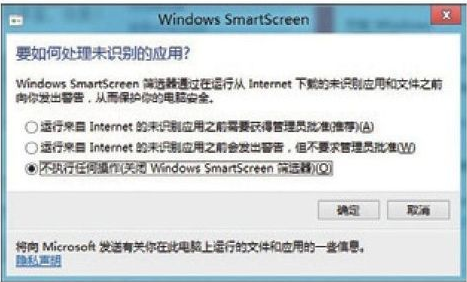
- 按「確定」並重新開機,設定生效。
提醒: 關閉 SmartScreen 將失去惡意網站攔截、未簽署執行檔警告等保護,建議僅在信任環境下暫時關閉,或改用協力廠商安全軟體補足防護。