Windows XP Windows 7 Windows 2003 Windows Vista Windows 綜合教學 Linux 系統教學
Windows 10 Windows 8 Windows 2008 Windows NT Windows Server 電腦軟體教學

Windows 8 行動中心同步中心設定:建立同步合作關係同步行動裝置資料

編輯:Win8 系統應用技巧

同步中心簡介

專為網路位置與檔案同步設計。同步行動裝置 (手機、MP3) 建議使用廠商提供的同步軟體或 Device Stage 功能。

操作步驟

  1. Win + X → 「行動中心」。
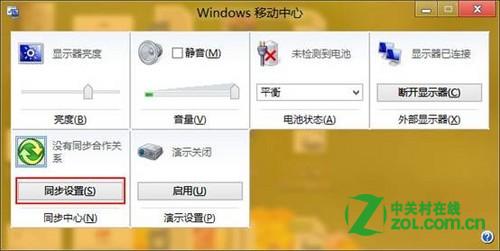
  2. 點擊「同步設定」按鈕。
  3. 左側點擊「設定新同步合作關係」 → 右側選取可同步裝置 → 依提示建立關係。
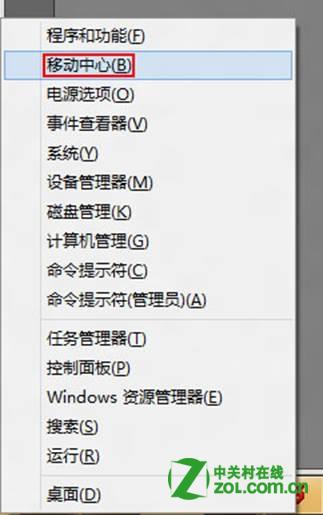
Win+X 行動中心 同步設定按鈕 設定新同步合作關係

立即同步

點擊「檢視同步合作關係」 → 選取裝置 → 工具列「同步」。

裝置未出現排查

  • 重新連接裝置或重新開機裝置。
  • 點擊同步中心「重新整理」按鈕。
  • 仍無法出現請檢查裝置驅動程式、USB 連接埠、廠商同步軟體是否安裝。
Copyright © Windows教程網 All Rights Reserved