Windows XP Windows 7 Windows 2003 Windows Vista Windows 綜合教學 Linux 系統教學
Windows 10 Windows 8 Windows 2008 Windows NT Windows Server 電腦軟體教學

Windows 8 「史上最快」關機方法:建立 shutdown.exe 混合關機捷徑固定到開始畫面/工作列

編輯:Win8 系統應用技巧

原理

使用 shutdown.exe /s /hybrid /t 0 指令:
/s 關機、/hybrid 混合關機 (快速啟動核心)、/t 0 立即執行。點擊即關機,無任何等待。

建立捷徑步驟

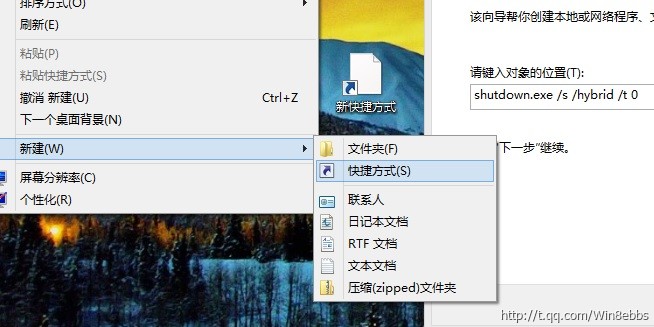
  1. 桌面右鍵 → 「新增」 → 「捷徑」。
  2. 輸入指令:shutdown.exe /s /hybrid /t 0 → 「下一步」。
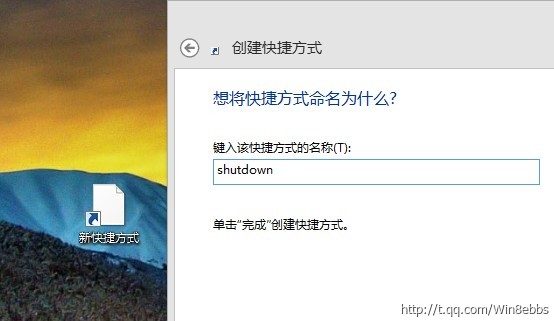
  3. 命名 (如「極速關機」) → 「完成」。
建立捷徑輸入指令 命名捷徑

美化與部署

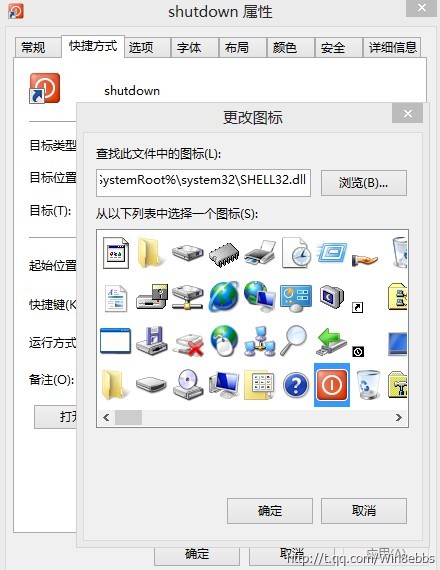
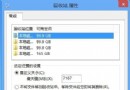
  1. 捷徑右鍵 → 「內容」 → 「變更圖示」 → 選擇關機圖示 → 確定。
  2. 捷徑右鍵 → 「固定到開始畫面」或拖曳到工作列。
變更圖示

警告

點擊即立即關機,無確認對話框! 請謹慎放置,避免誤觸導致資料遺失。Win8 時代許多用戶改用睡眠模式替代關機。

其他參數

  • shutdown -r -t 0:立即重新開機。
  • shutdown -a:取消排程關機/重開機。
  • rundll32 user32.dll,LockWorkStation:鎖定電腦。

Copyright © Windows教程網 All Rights Reserved