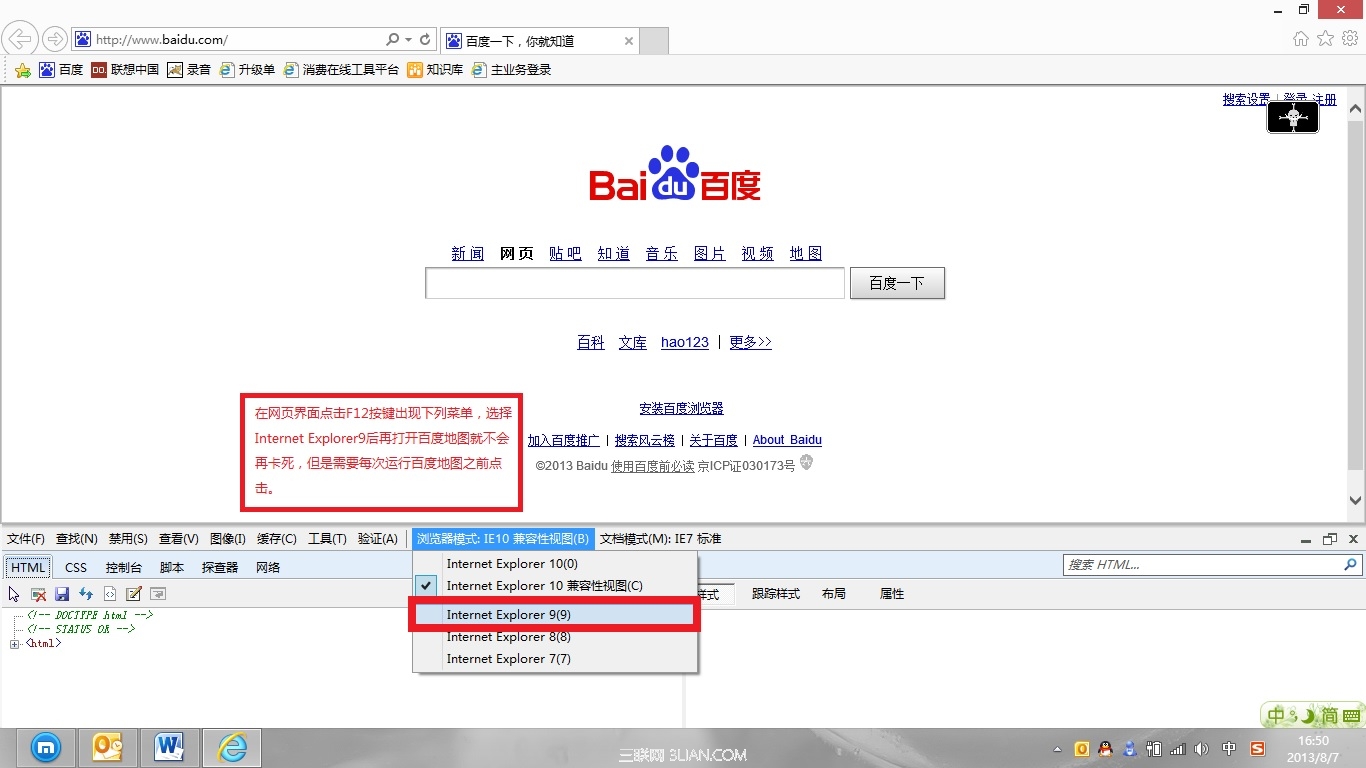
Windows 8 內建 IE10 開啟百度地圖即當機無回應,需結束進程。原因是百度地圖與 IE10 版本不相容。
注意:此設定不會保存,每次開啟百度地圖前需重複操作。若頻繁使用,建議改用 Chrome/Firefox 或等待百度更新相容版本。
Windows 8 應用商店下載安裝應用程式完整教學
Win8 將 IE10 圖示放置桌面(非捷徑)登錄表修改法
Win8 移除 Windows Media Player:控制台關閉 Windows 功能
Win8 安裝 VirtualBox 提示「系統找不到指定路徑」解決法
Windows 8 登入新選擇:PIN 碼與圖片密碼建立完整教學
Win8.1 系統還原錯誤 0x80070490:WinRE 映像遺失檢測與修復
Win8 停用滑鼠單點鎖定:控制台滑鼠屬性取消「啟用單點鎖定」
如何查看 Windows 8.1 版本與位元數