ThinkPad 預裝 Windows 8 改裝低版本系統需調整 BIOS 三大關鍵設定:Secure Boot、UEFI/Legacy 模式、SATA 控制器模式。操作前請先建立恢復媒體保留原廠系統。
BIOS 設定三步驟
- 開機按 F1 進入 BIOS
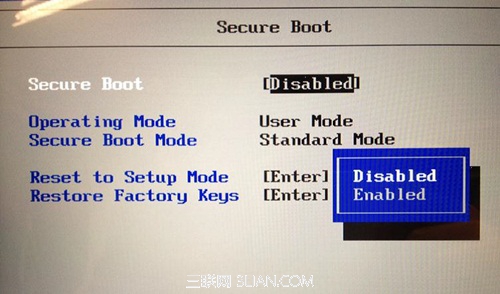
- Security → Secure Boot → Disabled
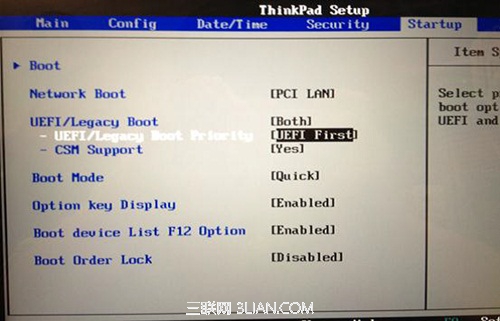
- Startup → UEFI/Legacy Boot 兩種選擇:
- 方案 A (通用):UEFI/Legacy Boot = Both,Priority = UEFI First。適用所有版本 OS 安裝。若報錯「找不到裝置驅動程式」係因無法識別 GPT 分區,此設定可解決。
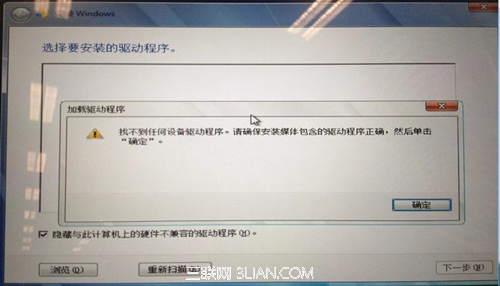
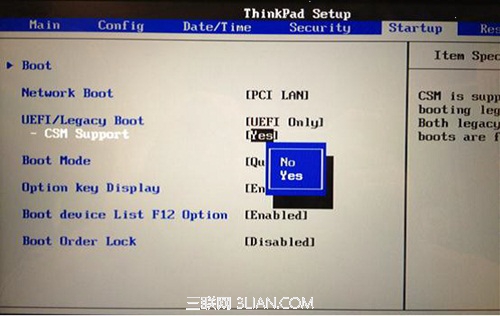
- 方案 B (僅 Win7 SP1 光碟安裝):UEFI/Legacy Boot = UEFI Only,CSM = Yes。屬 UEFI 相容模式。
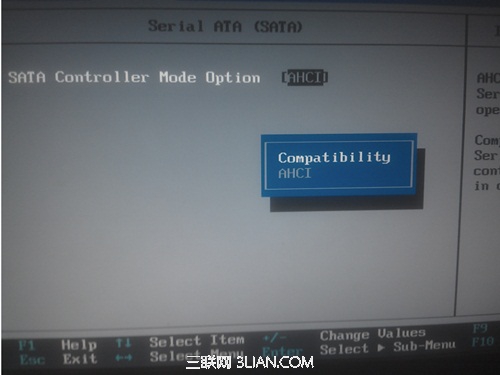
- 安裝 XP 時額外設定:Config → Serial ATA → SATA Controller Mode Option:AHCI → Compatibility (Vista/Win7 免改)
安裝啟動
- F10 儲存離開 BIOS
- 重啟按 F12 進入開機選單選擇光碟啟動
- 依 Windows 7 安裝精靈完成安裝
建議安裝前備份重要資料至外部儲存裝置。