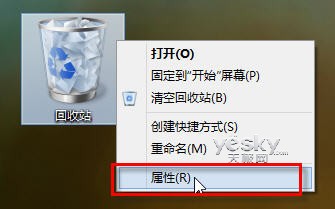
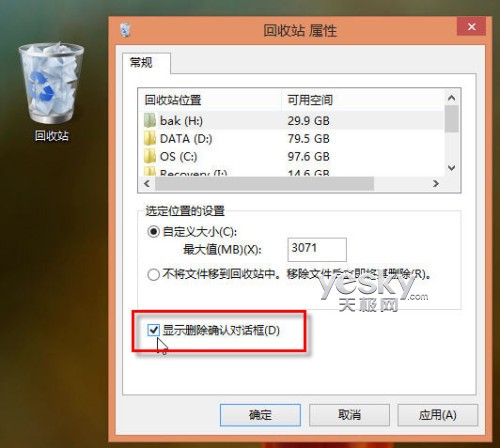
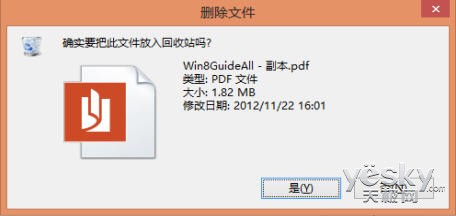
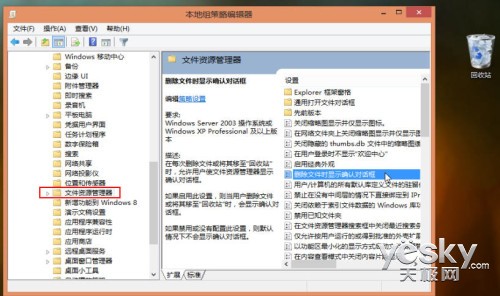
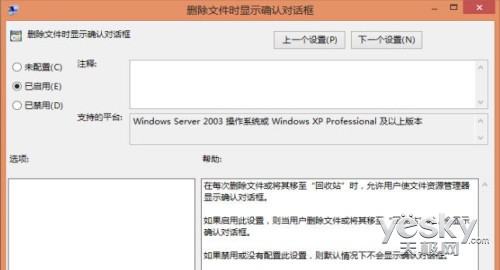
勾選後刪除檔案會彈出確認視窗。
gpedit.msc
Windows 8 停止運作/無法開機修復指南:從「重設電腦」到 WinRE 命令列完整方案
Windows 8 工作管理器雙模式深度解析:簡易檢視與詳細檢視的設計邏輯與操作差異
Win8 查看顯示卡資訊兩大技巧:dxdiag 內建工具與 GPU-Z 詳細規格
Windows 8 從安裝到優化完整圖文教程 (12 章節)
Win8.1玩LOL(英雄聯盟)閃退/無法啟動?V3.1.0.3升級+32位補丁+關閉快速啟動三步修復
Win8.1/RT 8.1 新增語言與鍵盤版面完整教學:顯示語言、輸入法切換、預設鍵盤設定
Windows 8 安裝印表機完整指南:自動偵測、手動新增、進階設定與疑難排解
Windows 8 如何鎖定開始畫面磚塊位置防止誤動