Windows 8 將「資料夾選項」中的隱藏檔案顯示設定直接提升至檔案總管的 Ribbon 介面,無需進入控制台即可一鍵切換。
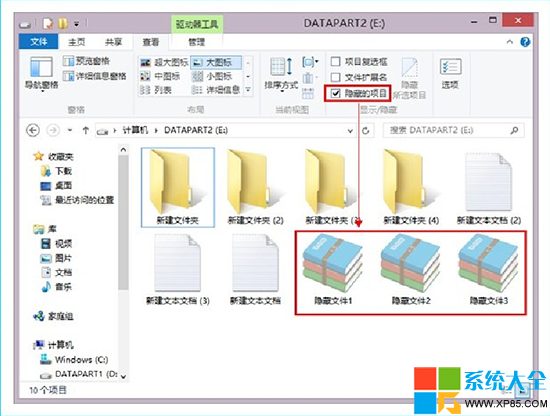
取消勾選即可再次隱藏。此設定為全域生效,影響所有資料夾視圖。
如何阻止 Windows 8 自動升級至 Windows 8.1?含降級回 Win8 步驟
筆記型電腦預裝 Windows 8 改裝 Windows 7 完整教學(BIOS 設定與分區)
Windows 8 設定 OneDrive 離線存取,無網路也能用檔案
Windows 8 抗霧霾天氣應用程式推薦:墨跡天氣、天氣通、天氣幫幫忙、北京 PM2.5
Windows 命令提示字元預設視窗大小與緩衝區修改:註冊表 WindowSize/ScreenBufferSize 十六進位對應、快速設定指令
Win8 DPI 縮放設過大導致介面超出螢幕?安全模式與登錄表雙重救援