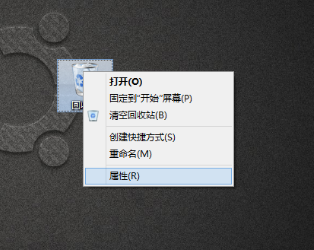
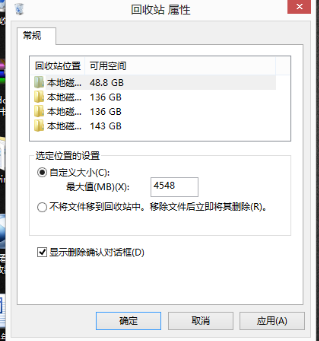
Windows 8 預設將檔案直接移至資源回收筒而不提示,若習慣確認機制,可依下列步驟開啟:
之後刪除檔案時,系統將彈出「確定要移動這個檔案到資源回收筒嗎?」的確認視窗。
Win8.1 電腦開機/運行變慢?停用啟動項與服務雙管齊下 5 分鐘加速
破解 Windows 8 解析度過低無法執行 Metro 應用程式限制
Win8.1 控制台找不到 BitLocker?檢查版本與服務兩步驟
Win8.1 安裝後首次設定 (OOBE) 完整流程:背景色、快速設定、帳號建立
Windows 8 變更使用者帳戶名稱完整圖文教學
Win8 系統瘦身攻略:安全不反彈的 C 槽清理實戰 (刪除備份、移除預設 App、壓縮 WinSxS、零位元化 Backup)
Windows 8 Metro 應用程式閃退/無法開啟多種修復方案
Win8 PE 個性化修改教學:電腦屬性資訊、LOGO、桌面綠色軟體全客製化