故障現象: 全新安裝 Windows 8、未安裝第三方軟體,開機後 CPU 持續佔用 20%-30%,硬碟存取燈長時間閃爍。
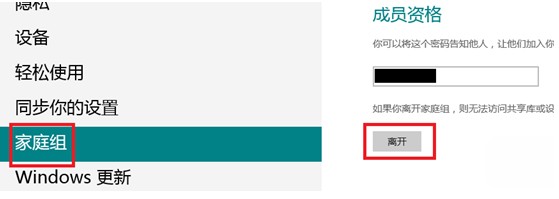
原因分析: 使用 Microsoft 帳戶(Windows Live ID)登入會自動加入家庭群組,聯網同步使用者設定資料導致系統資源持續被佔用。
完成上述步驟後重新開機,CPU 佔用率與硬碟存取狀況即可恢復正常。若需保留同步功能,建議在系統穩定後再重新加入家庭群組。
Windows 8 停用內建 Administrator 帳戶保障系統安全
Windows 8 區域網路檔案共享完整設定教學
Win8 無線網路受限/無連線四大排查面向:訊號/路由器/費用/中文 SSID
Win8 無線網路不穩定三步驟優化:裝置管理員、TCP/IP、路由器設定
Windows 8 安裝後如何調整為 UEFI 啟動模式
Win8/8.1 快速建立本地搜尋捷徑,一鍵啟動檔案搜尋
Windows 8 開始畫面固定任意檔案教學:匯入登錄檔啟用「固定到開始畫面」右鍵選單
Win8.1 無線網路受限/斷線解決:啟用 FIPS 相容性與更新網卡驅動