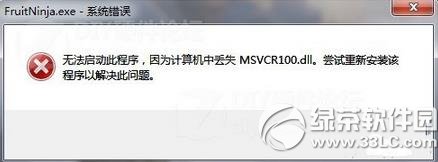
MSVCR100.dll 屬於 Microsoft Visual C++ 2010 Redistributable 運行庫。常見於:誤刪系統檔、優化軟體過度清理、軟體安裝未正確部署運行庫。
MSVCR100.dll
C:\Windows\System32
C:\Windows\SysWOW64
此解法同樣適用於 Windows 7、8.1、10 等版本出現相同 DLL 遺失錯誤。
Windows 8 任務管理器全方位深度解析:新手也能輕鬆掌握的進階技巧
Windows 8 調整螢幕色彩品質(色深)設定
預裝 Windows 8 系統電腦如何新增磁碟分區
Windows 8 Metro 即時搜尋:Win+C 呼叫 Charms 搜尋支援模糊查詢
Win8.1 系統 USB 開機安裝碟製作教學:UltraISO 燒錄 ISO 到 USB
善用 SFC /Scannow 一鍵修復 Win8 系統受損元件
Win8 應用商店下載安裝 QQ 完整教學
Windows 8 工作列小白旗出現紅叉?關閉操作中心提示即可解決