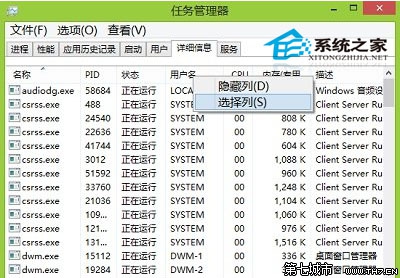
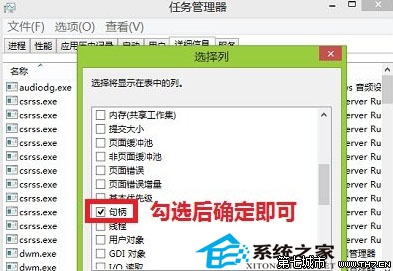
Windows 8 工作管理器「詳細資料」索引標籤預設欄位有限,可自訂顯示控制代碼、執行緒、使用者物件、GDI 物件等進階資訊。
新增欄位即時生效,方便開發者與進階使用者監控程式資源洩漏、執行緒狀態、I/O 活動等細節。
Windows 8.1 將 USB 隨身碟與磁碟機分組顯示的技巧
Win8 IE 固定網頁字號:Internet 選項→「一般」→「輔助功能」→ 勾選「忽略網頁上指定的字號」
Windows 8.1 關閉應用程式自動更新設定教學
Windows 8 Word 2003 稿紙增益集無法解除安裝解決:刪除登錄檔產品代碼
Win8 啟用「休眠」選項:gpedit.msc 開啟群組原則,啟用「在電源選項功能表中顯示休眠」
Windows 8 可同步的個人化設定:主題、鎖定畫面、Microsoft 帳號漫遊
Windows 8 安裝程式出現錯誤 2502/2503 解決:以系統管理員身分執行 MSI
Win8 六大隱藏功能盤點:開始選單、自動備份、同步、快捷鍵、簡易重裝