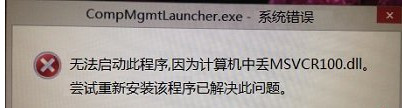
右鍵「這台電腦」→「管理」彈出 CompMgmtLauncher.exe - 系統錯誤:遺失 MSVCR100.dll,原因是 Visual C++ 2010 執行階段庫檔案遺失或損毀。
CompMgmtLauncher.exe - 系統錯誤:遺失 MSVCR100.dll
MSVCR100.dll
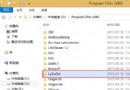
C:\Windows\System32
修復後右鍵管理即可正常開啟電腦管理主控台。此法同樣適用於其他缺少 MSVCR100.dll 的程式錯誤。
Win8.1 Update 企業版功能總覽:比專業版多哪些?
Windows 8 取消工作列圖示縮圖預覽:群組原則編輯器設定
Windows 8 開始畫面「影片」應用程式播放技巧:開啟、控制、縮圖預覽全螢幕
Win8.1 關閉自動更新:控制面板→系統和安全→Windows Update→啟用或關閉自動更新→選「從不檢查更新」
Windows 8 設定預設瀏覽器:透過控制台「預設程式」指定 Chrome/Firefox/Edge 為預設
Windows 8.1 新功能曝光:Kids Corner 家長控制功能或將加入
Windows 8 內建「敘述者」輔助功能:Win+Enter 快速啟動
Windows 8 工作列圖示疊加顯示三大技巧:隱藏文字、建立工具列、Bins 堆疊