Windows XP Windows 7 Windows 2003 Windows Vista Windows 綜合教學 Linux 系統教學
Windows 10 Windows 8 Windows 2008 Windows NT Windows Server 電腦軟體教學

Windows 8 解決寬帶連線自動彈出 Bing 網頁:登錄修改 EnableActiveProbing

編輯:Win8 系統應用技巧

Windows 8 撥號上網後自動彈出 Bing 網頁,是網路連線狀態偵測機制(NCSI)觸發。修改登錄關閉主動探測即可停用。

修改步驟

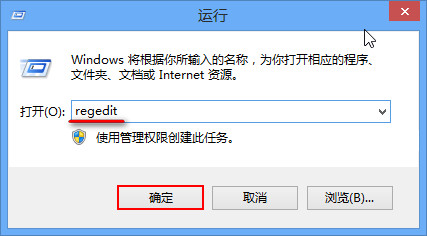
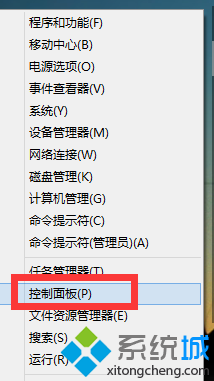
  1. Win+R → regedit 開啟登錄編輯器。
  2. 開啟登錄編輯器
  3. 定位至 HKEY_LOCAL_MACHINE\SYSTEM\CurrentControlSet\Services\NlaSvc\Parameters\Internet。
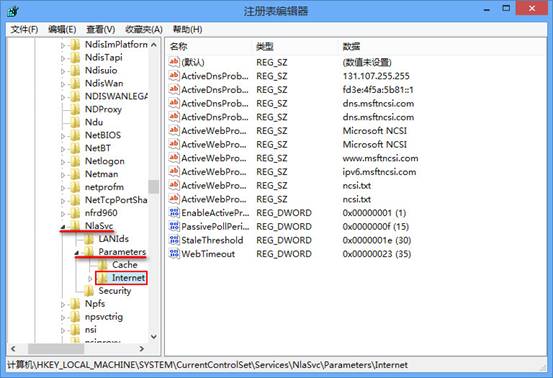
  4. 登錄路徑
  5. 右鍵 EnableActiveProbing →「修改」→ 數值資料改為 0 →「確定」。
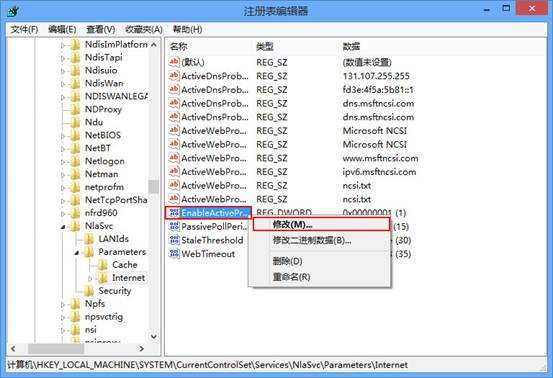
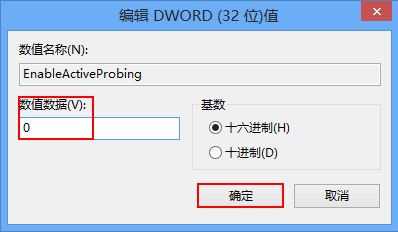
  6. 修改 EnableActiveProbing 設為 0

重開機後重新撥號,不再自動彈出 Bing 網頁。此設定不影響實際網路連線功能。

Copyright © Windows教程網 All Rights Reserved