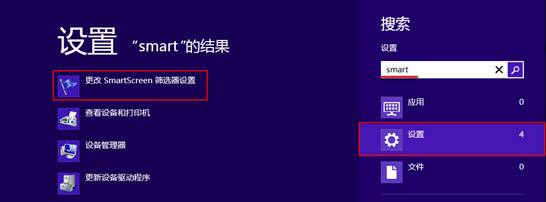
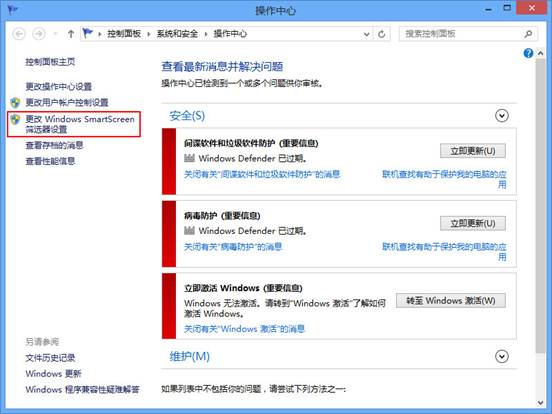
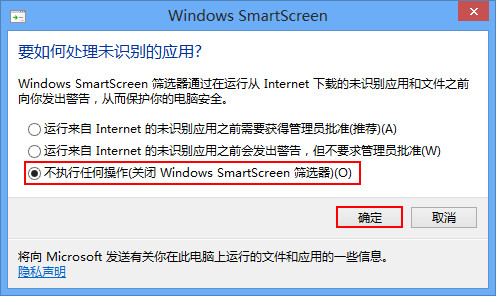
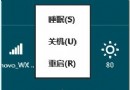
Windows 8 SmartScreen 篩選器會檢查下載檔案與網站信譽,有時會誤攔截信任軟體。可暫時關閉以安裝測試軟體,事後建議重新開啟保護系統安全。
smart
安裝測試完成後,請依同樣路徑改回「取得核准前先詢問」或「需要核准才能執行」,恢復保護。
Win8.1 移除預裝應用程式:Windows 8 App Remover 圖形化工具
Windows 8.1 應用商店終於支援支付寶!免國際信用卡直接用儲蓄卡買 App
Win8 銳捷客戶端頻繁掉線?網卡速度雙工模式改 100Mbps 半雙工解決
Win8 記憶體虛擬硬碟軟體:Primo Ramdisk 使用教學
Win8.1 如何關閉 IE11「網址輸入聯想」功能?
Windows 8 修改虛擬記憶體(分頁檔)大小與位置
Win8 圖片密碼設置全圖解:三步手勢登入替代傳統密碼,支援點/線/圓任意組合
Win8 快速切換應用程式三大法:Alt+Tab、左上角熱區、左側邊欄預覽