Windows XP Windows 7 Windows 2003 Windows Vista Windows 綜合教學 Linux 系統教學
Windows 10 Windows 8 Windows 2008 Windows NT Windows Server 電腦軟體教學

Win8 無線網路受限/無法上網?三條 netsh 指令優化 TCP/IP 相容性

編輯:Win8 系統應用技巧

預裝 Win8 筆電常出現「網路受限」黃色驚嘆號,主因是 TCP/IP 參數與特定路由器/AP 相容性不佳。以系統管理員身分執行三條 netsh 指令即可優化。

操作步驟

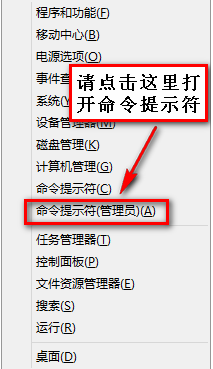
  1. Win+X → 「命令提示字元 (系統管理員)」。
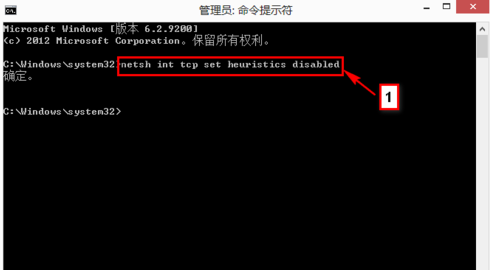
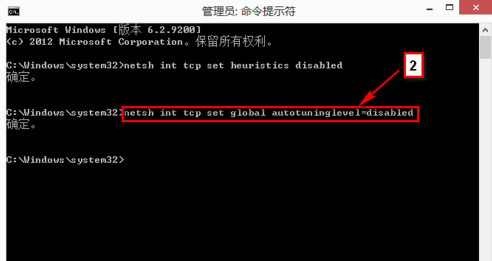
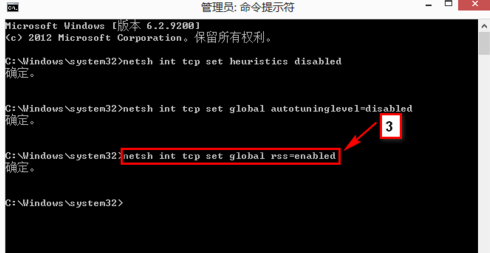
  2. 依序輸入以下指令,每行按 Enter:
netsh int tcp set heuristics disabled
netsh int tcp set global autotuninglevel=disabled
netsh int tcp set global rss=enabled

  1. 重新開機 → 重新連線測試。
Win+X 選單 命令提示字元管理員 指令1 執行 指令2 執行 指令3 執行 Windows 8 系統簡介

補充建議

若上述無效,請至裝置管理員移除無線網卡驅動,再下載廠商最新驅動重裝。

Copyright © Windows教程網 All Rights Reserved