Windows 8.1 系統頻繁彈出「Windows 10 Insider Preview」更新提示,干擾使用者工作。若暫不打算升級至尚在測試階段的 Windows 10,可透過 Windows Update 隱藏此更新,停止提醒。本文說明操作步驟。
隱藏更新步驟
- Win+X → 控制台。
- 系統及安全性 → Windows Update。
- 點選「檢查更新」→ 待掃描完成。
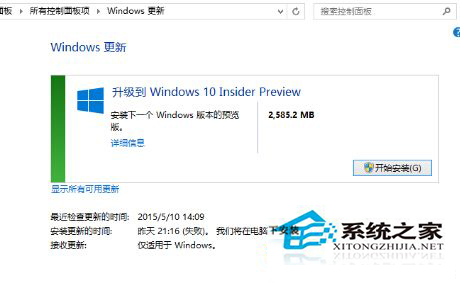
- 在「可用更新」清單中找到「Windows 10 Insider Preview」或相關升級項目。
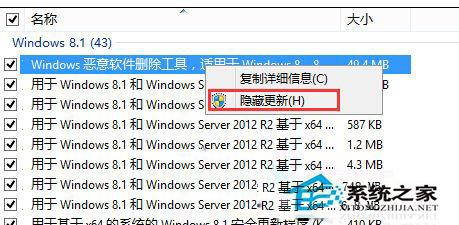
- 右鍵點選 → 「隱藏更新」。
- 系統將不再顯示該更新提醒,也不會自動下載安裝。
恢復顯示隱藏更新
- Windows Update → 左側「還原隱藏的更新」。
- 勾選欲恢復的更新 → 「還原」。
適用範圍
- 同樣適用於隱藏其他不想安裝的選用更新、驅動程式更新、語言套件等。
- Windows 7/8/8.1/10 皆支援此隱藏更新機制。
隱藏後若官方釋出正式版 Windows 10 升級 (非 Insider Preview),通常會以「重要更新」或「建議更新」形式重新出現,不受隱藏設定影響。