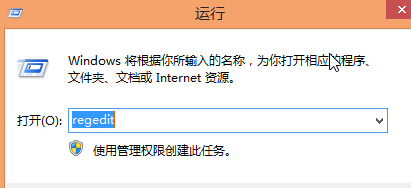
regedit
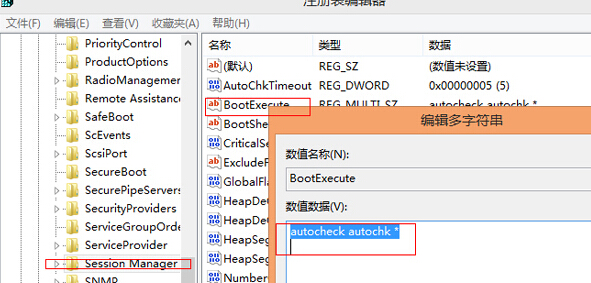
HKEY_LOCAL_MACHINE\SYSTEM\CurrentControlSet\Control\Session Manager
BootExecute
重開機後不再執行 Autochk 掃描,節省開機等待時間。注意:長期關閉可能累積檔案系統錯誤,建議定期手動執行 chkdsk /f 維護。
chkdsk /f
Win8 開始畫面圖示分組命名:右鍵選自訂 → 未命名組點擊改名 → 完成分組管理
Win8.1 開啟傳統 F8 進入安全模式:關閉快速啟動 + bcdedit
Windows 8 音樂應用程式匯入播放清單,整合 iTunes 與媒體庫
Win8.1 修改暫存檔路徑 (TEMP/TMP) 移至非系統盤:環境變數兩步驟
Windows 8 無線網路總是「受限」或「正在識別」?關閉網卡省電功能即可解決
Win8.1 連接外接投影機/顯示器 雙螢幕設定與無線投影 Miracast
Windows 8 檔案總管永遠顯示功能表列:檢視選單→選項→變更資料夾與搜尋選項
Windows 8 系統內建「顯示密碼」功能:輕鬆檢視明文避免輸入錯誤