Windows 8 桌面圖示卡住無法拖曳,常見四種快速解法。
解法一:取消自動排列 (最常見)
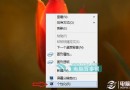
- 桌面空白處右鍵 → 「檢視」→ 取消勾選「自動排列圖示」。
解法二:重新啟動檔案總管
- Ctrl+Shift+Esc → 「進程」→ 找到「Windows 檔案總管」→ 右鍵 → 「重新啟動」。
解法三:多按 Esc 鍵
- 連續按 3-5 次 Esc,可釋放可能卡住的拖曳狀態。
解法四:移除桌面管理軟體
- 解除安裝 Fences、Stardock、DesktopOK 等桌面圖示管理工具 → 重新啟動檔案總管。
進階:檢查登錄
HKEY_CURRENT_USER\Software\Microsoft\Windows\Shell\Bags\1\Desktop 刪除 FFlags 值可重設圖示排列狀態。
依序嘗試,通常解法一或二即可解決,非硬體故障。