Windows XP Windows 7 Windows 2003 Windows Vista Windows 綜合教學 Linux 系統教學
Windows 10 Windows 8 Windows 2008 Windows NT Windows Server 電腦軟體教學

Win8.1 Windows Update 錯誤 8024401C?微軟官方建議重命名 SoftwareDistribution

編輯:Win8 系統應用技巧

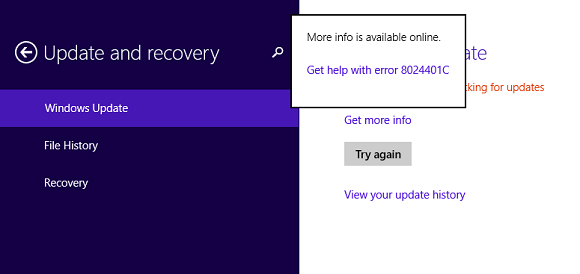
Windows 8.1 檢查更新出現錯誤 8024401C (或 WindowsUpdate_8024401C),微軟官方建議重設 Windows Update 快取資料夾。

官方修復步驟

  1. Win+X → 「命令提示字元 (系統管理員)」。
  2. 執行 net stop wuauserv 停止 Windows Update 服務。
  3. 開啟 C:\Windows,將 SoftwareDistribution 資料夾重新命名為 SDold。
  4. 執行 net start wuauserv 重新啟動服務。
  5. 再次檢查更新,錯誤應消失。

8024401C 錯誤畫面

原理

SoftwareDistribution 存放更新下載暫存檔,損毀或鎖定導致更新服務異常。重命名強制重建乾淨快取目錄,服務重啟後自動重新下載必要中繼資料。

Copyright © Windows教程網 All Rights Reserved