Windows XP Windows 7 Windows 2003 Windows Vista Windows 綜合教學 Linux 系統教學
Windows 10 Windows 8 Windows 2008 Windows NT Windows Server 電腦軟體教學

Win8 IE 無法開啟網頁、選項全灰?sfc /scannow 修復系統檔

編輯:Win8 系統應用技巧

Internet Explorer 突然無法開啟網頁、設定選項全灰無法操作,通常是系統核心檔案損毀。執行系統檔案檢查器 sfc /scannow 可自動修復。

修復步驟

  1. Win+X → 「命令提示字元 (系統管理員)」。
  2. 輸入 sfc /scannow (注意 sfc 後有空格) → Enter。
  3. 等待掃描進度達 100% 完成,重新開機測試 IE。

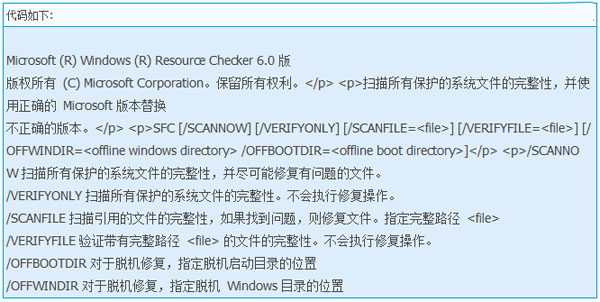
sfc 重要指令參考

原理說明

sfc (System File Checker) 掃描受保護系統檔案,若發現檔案被錯誤版本覆寫或損毀,會從元件存放區 (WinSxS) 還原正確版本。亦可修復元件存放區本身。

延伸應用

sfc 參數豐富 (如 /verifyonly、/scanfile、/offbootdir 等),可用於離線修復、指定檔案驗證等進階場景,建議進階使用者深入研究。

Copyright © Windows教程網 All Rights Reserved