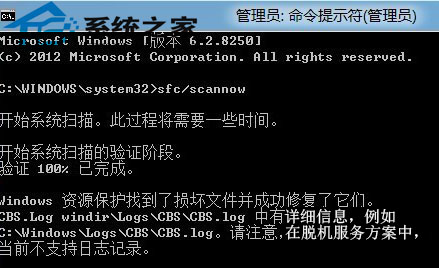
應用商店是 Win8 核心特色,若被優化軟體誤刪或損壞,無需重裝系統。以系統管理員身分執行 sfc /scannow,系統會自動掃描並修復損壞的系統檔案,讓應用商店重現螢幕。
sfc /scannow
喜歡系統優化的使用者請記住這招,誤刪應用商店也能輕鬆找回。
Windows 8.1 微軟拼音輸入法雲端候選功能:啟用與常見問題解答
Windows 8.1 VPN 連線錯誤 720?WAN 微型連接埠驅動異常修復法
Win8 將檔案藏在圖片中 (copy /b 指令):同 80481 內容,請參考該文
Windows 8 本機安全性原則深度解析:密碼防暴力破解、防火牆進階規則、AppLocker 應用程式控制完整指南
Windows 8 用 IE 瀏覽器建立 VPN 連線:網際網路選項 → 連線 → 新增 VPN
Windows 8 設定使用者帳戶密碼完整圖文教學
Win8.1 找回檔案總管「資料庫」功能:三步驟顯示隱藏的庫
Win8 啟用休眠選項:電源選項勾選休眠讓關機選單出現休眠