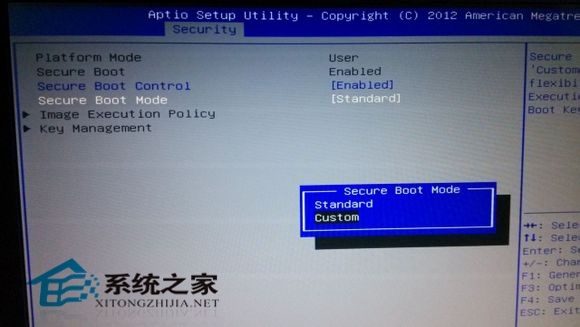
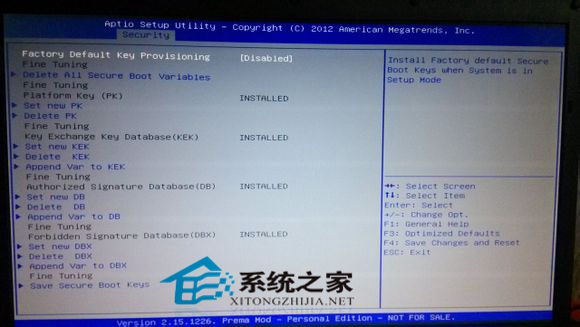
Win8 UEFI 關閉 Secure Boot 升級 Win8.1 後桌面右下角出現「Secure Boot 未正確配置」浮水印。BIOS 設定解決:Secure Boot Mode 改 Custom → Key Management 安裝原廠預設金鑰 → 改回 Standard 存檔重啟。
雖需進 BIOS 但步驟不多。Secure Boot 正確配置後系統安全性提升,浮水印移除讓桌面更乾淨。
Win8 設定音訊管理器解決聲音異常:喇叭/麥克風偵測與設定
Windows 8.1 無法啟用休眠解決方案:磁碟空間不足導致 hiberfil.sys 無法建立
Windows 8 查找下載主題包安裝路徑與背景圖檔位置
Win8.1 檔案總管程式庫消失怎麼辦?一鍵找回隱藏的程式庫功能
Windows 8 玩轉微博必備:新浪微博官方客戶端深度體驗
Win8 線上影片無法播放?安裝 Flash Player 並啟用 IE 增益集
Win 8 系統 IE10 瀏覽器網頁顯示不全?兩大相容性檢視解決方案
Win7/Win8 雙系統移除 Win8 完整步驟:msconfig 刪除啟動項 + 格式化分區