Windows 8 Modern 介面預設會顯示各類操作提示貼紙(說明貼紙),對熟練使用者造成干擾。透過登錄檔建立 DisableHelpSticker 值可徹底停用,乾淨無干擾。
regeditHKEY_CURRENT_USER\Software\Policies\Microsoft\WindowsEdgeUIEdgeUI →「新增」→「DWORD (32 位元) 值」 → 命名 DisableHelpStickerDisableHelpSticker → 數值資料改為 1 → 確定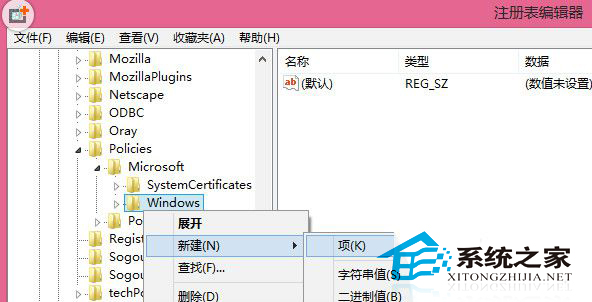
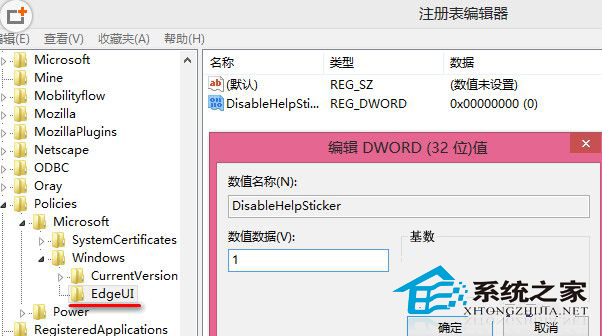
若需恢復提示:刪除 DisableHelpSticker 值或改為 0,或使用「系統還原」回溯登錄檔變更。
Win8.1 系統映像備份強制包含 D 槽?排除用戶資料夾遷移、分頁檔、Program Files 三大誤判成因
Windows 8 全新熱鍵大全:Win 鍵組合鍵完整圖表與 Metro/桌面雙環境差異說明
Windows 8 Metro 介面即時搜尋功能:Win+C 喚出搜尋魅力支援模糊查詢
Windows 8.1 解决海盗船 Hydro 系列风扇不兼容的注册表修复
Windows 8.1 開始畫面磚塊不顯示圖片(灰色方框)解決:更換 DNS
Win8 升級 Win8.1 Update 完整圖文教學:商店 → Windows Update 兩階段
Windows 8.1 無法執行 Java 程式解決方案:啟用瀏覽器 Java 內容、重置 Java 控制台、停用特定外掛程式