Windows XP Windows 7 Windows 2003 Windows Vista Windows 綜合教學 Linux 系統教學
Windows 10 Windows 8 Windows 2008 Windows NT Windows Server 電腦軟體教學

如何查看 Windows 8.1 是否已升級 Update 版本?開始畫面電源按鈕判別法

編輯:Win8 系統應用技巧

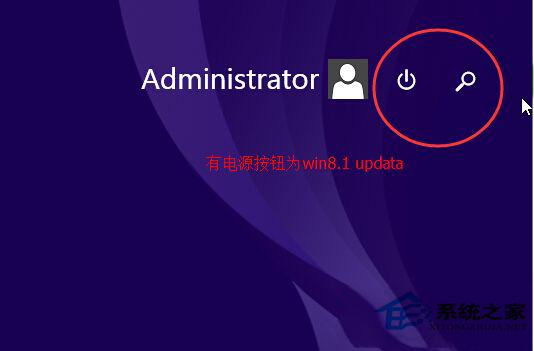
Windows 8.1 Update (含 Update 1/2/3) 在開始畫面右上角新增電源按鈕 (關機/重新啟動/睡眠),原版無此按鈕。對比開始畫面右上角即可秒辨版本。

判別方法

  • Windows 8.1 (RTM/無 Update):開始畫面右上角**無**電源按鈕,僅有使用者頭像/搜尋/語言等圖示。
  • Windows 8.1 Update:開始畫面右上角**有**電源按鈕 (圖示為圓圈加豎線),點選可直接關機/重開機/睡眠。
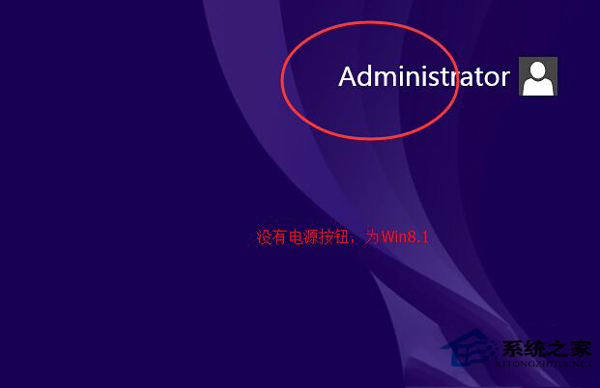
Windows 8.1 開始畫面無電源按鈕

Windows 8.1 Update 開始畫面有電源按鈕

Windows 8 則完全無開始按鈕/畫面 (傳統桌面直接啟動),更易區分。

Copyright © Windows教程網 All Rights Reserved