Windows XP Windows 7 Windows 2003 Windows Vista Windows 綜合教學 Linux 系統教學
Windows 10 Windows 8 Windows 2008 Windows NT Windows Server 電腦軟體教學

Windows 8/8.1 開機恢復 F8 進入進階啟動選單的方法

編輯:Win8 系統應用技巧

前言

Windows 8 預設移除了傳統開機時按 F8 進入「進階啟動選單」的功能,改為圖形化的復原環境。若您習慣使用 F8 選單(如安全模式、低解析度模式等),可透過修改開機設定資料庫 (BCD) 來恢復舊式選單。

操作步驟

  1. 以「系統管理員身分」開啟「命令提示字元」。
  2. 輸入以下指令並按 Enter:
bcdedit /set {default} bootmenupolicy legacy
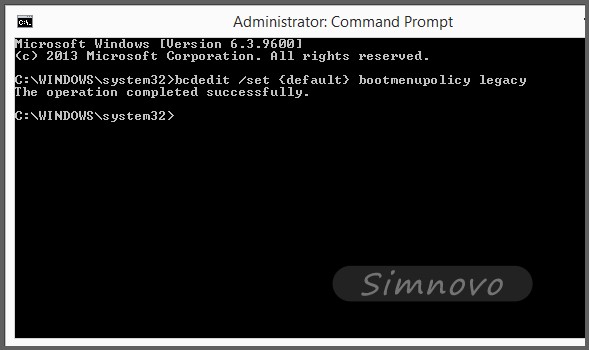
命令提示字元執行 bcdedit

完成後重新開機,開機時反覆按 F8 即可看到傳統的進階啟動選單。

還原為預設圖形化啟動選單

若想恢復 Windows 8/8.1 原生的圖形化啟動選單,請執行:

bcdedit /set {default} bootmenupolicy standard

適用版本

此方法同樣適用於 Windows 8.1。

Copyright © Windows教程網 All Rights Reserved