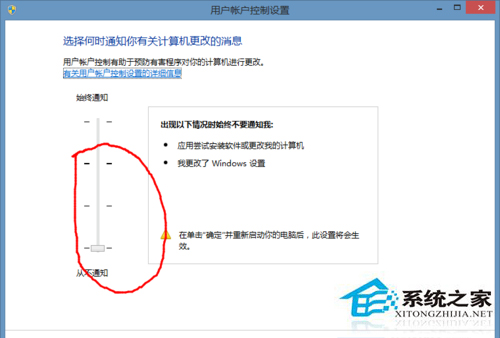
Windows 8 程式捷徑圖示疊加 UAC 小盾牌影響美觀。可透過將 UAC 設定拖至「永不通知」移除盾牌,但會降低系統安全性。
重開機後所有捷徑圖示盾牌消失。**注意:此操作等同關閉 UAC,系統將不再攔截未授權的系統層級變更,安全性大幅降低。** 建議改用第三方工具 (如 Resource Hacker 修改捷徑圖示資源) 僅移除視覺盾牌保留 UAC 功能。
Windows 8 建立系統修復媒體完整教學:USB 隨身碟與光碟雙模式圖文
Win8.1 建立 VPN 連線完整圖文教學:PPTP 協定設定詳解
Windows 8 關機方法大彙總:網友實測 10 招,從 Charms 列到快速鍵一次滿足
Windows 8.1 升級詳細圖文教學:從應用商店免費更新完整流程
Win8 如何開啟「執行」指令?兩種快速方法
Win8 開機後硬碟指示燈不亮?關閉快速啟動恢復正常硬碟活動顯示
Win8 步驟記錄器使用教程:Win+C 開啟搜尋 → 輸入「步驟記錄器」 → 開始記錄操作步驟
解決 Win 8 安裝郵件/行事曆/人脈應用錯誤 0x80073cff 的 PowerShell 修復指令