Win8 專業版/企業版 64 位元內建 Hyper-V,功能媲美 VMware/VirtualBox,且支援虛擬交換機:
硬體需求
- 64 位元 Windows 8 專業版/企業版 (核心版無 Hyper-V)。
- CPU 支援虛擬化 (Intel VT-x / AMD-V) 且具備二級位址轉譯 (SLAT/EPT/RVI)。
- 記憶體建議 8GB 以上 (需分配給 VM)。
啟用 Hyper-V
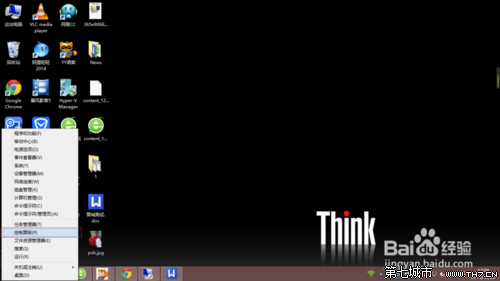
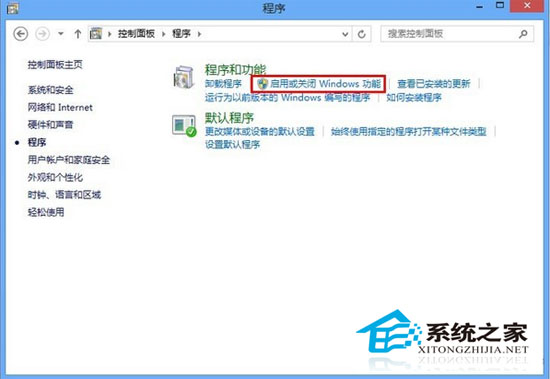
- 控制台→程式→開啟或關閉 Windows 功能。
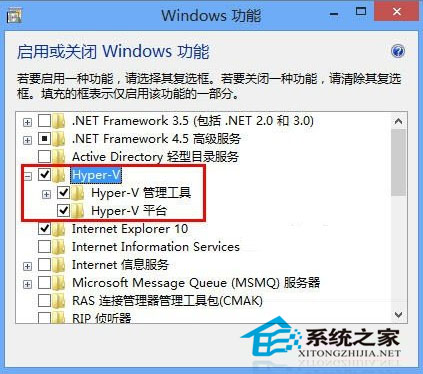
- 勾選「Hyper-V」→ 確定 → 重開機。
- 開始畫面出現 Hyper-V 管理員、虛擬交換機管理員等磚。
建立虛擬機要點
- 新增虛擬交換機 (外部/內部/私人) → 虛擬網卡需連接交換機才能上網。
- 新增虛擬機 → 指派記憶體、虛擬硬碟、網路介面卡 (選擇已建立的虛擬交換機)。
- 掛載 ISO 安裝作業系統。
32 位元系統因記憶體限制 (≤4GB) 未提供建立 VM 功能,僅能連接現有 VM。