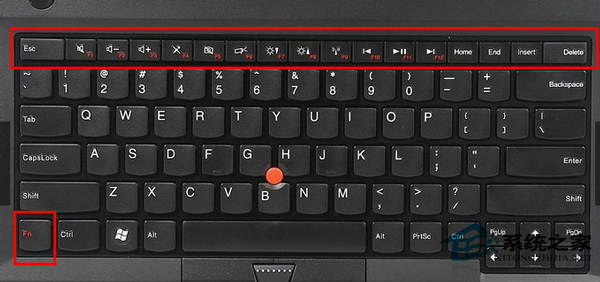
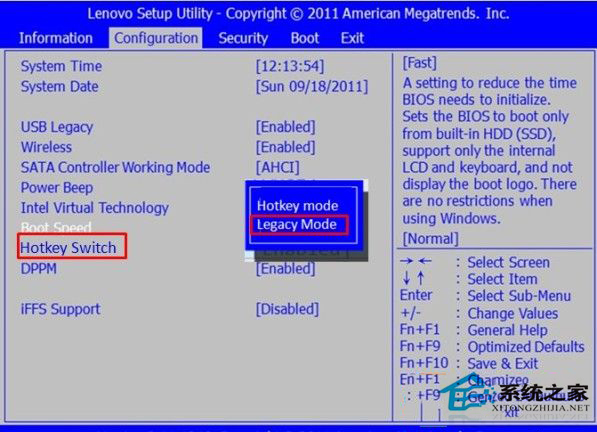
聯想筆電預設 F1-F12 為多媒體熱鍵 (音量、亮度等),需按 Fn 才能觸發傳統功能。透過 BIOS 將「Hotkey Mode」改為「Legacy Mode」即可恢復 F1-F12 直接觸發傳統功能。
Configuration
Hotkey Switch
Hotkey Mode
Legacy Mode
設定後 F1-F12 直接發揮傳統功能 (如 F5 重新整理、F12 開發者工具),多媒體功能需按 Fn + 對應鍵觸發。
Windows 8 開始畫面 IE10 重複閃退解決:關閉 IE 功能重啟、排除第三方優化軟體干擾
Windows 8 電源選單加入「休眠」選項:筆電省電必備功能啟用教學
華碩 15 吋 Win 8 超極本 S500CA 評測:外觀、螢幕、音效、鍵盤實測
Win8.1 核心版、專業版、企業版差異詳解:依需求選對版本
Windows 8.1 設定登入後直接進入傳統桌面
Win8.1 x64 安裝 KB2942844 (Flash Player) 更新失敗 80073712?三階段修復元件存放區徹底解決
Win8雙系統如何設置預設開機系統?圖文教你修改啟動順序與等待時間
Windows 8 關閉操作中心通知與圖示完整教學