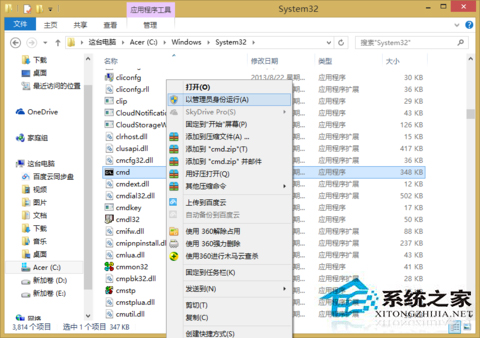
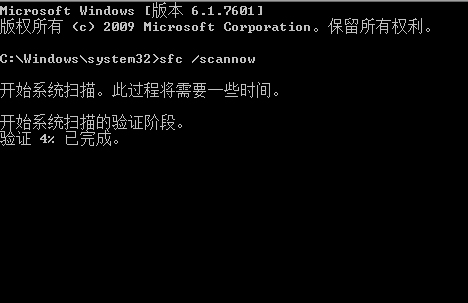
Windows 8 系統檔案損壞或遺失導致程式無法啟動、功能異常,可使用內建系統檔案檢查器 (SFC) 掃描並自動修復所有受保護系統檔案。
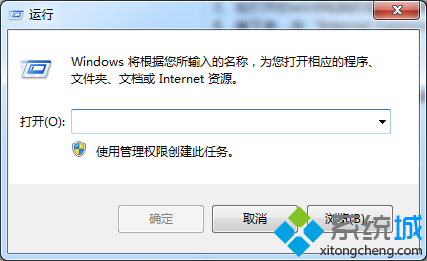
CMD
sfc /scannow
技術細節:sfc /scannow 會比對 %WinDir%\System32\dllcache 中的快取副本 (壓縮存放) 替換損壞檔案。%WinDir% 通常為 C:\Windows。
%WinDir%\System32\dllcache
%WinDir%
C:\Windows
Win 8 開啟命令提示字元(CMD)三大法:Win+X 選單、搜尋列、以系統管理員身分執行
Win8 應用商店下載錯誤 80073cf0?重命名 SoftwareDistribution 快取資料夾
Windows 8.1 Update RTM 移除教學:僅需解除安裝兩個補丁即可降級回 Win8.1
Win8 F1 無法開啟說明與支援?搜尋 winhlp32 執行檔手動喚起
Win8.1 有效取消開機密碼兩法:netplwiz 自動登入 vs 登錄修改
Win8 螢幕亮度調節:超級按鈕→設定→亮度滑桿最快
Win8/8.1 開資料夾慢/無響應?關閉 Defender 實時掃描或添加排除項 + 關閉索引壓縮內容雙管齊下
Win8 系統 IE 瀏覽器全螢幕瀏覽網頁的兩種快捷方法