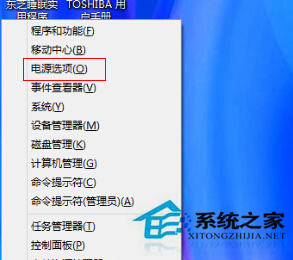
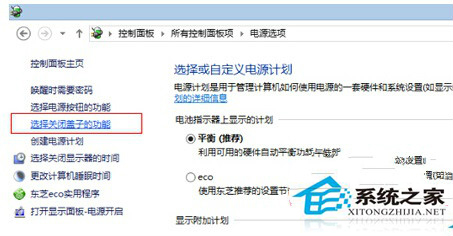
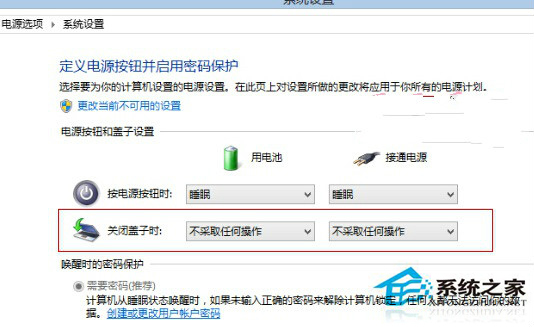
合上筆記本蓋子預設為睡眠/關機,改為「不採取任何動作」即可保持運作 (如外接螢幕/下載)。
同介面可設定電源按鈕/睡眠按鈕動作。此設定適用 Win7/8/8.1/10/11 通用。
Win 8 使用 BitLocker 為 USB 隨身碟設定密碼保護資料安全
Windows 8 十一大細節深度解析:從多進程複製到圖片解鎖
Windows 8 SkyDrive 整合應用體驗:本地與雲端無縫連結
Windows 8 Metro 應用卡在「掛起」狀態無法安裝?清理 SoftwareDistribution 快取解決
Windows 10 還原至 Windows 7/8.1 完整操作教學
Windows 8 打造更健康的儲存環境:從線上自我修復到精準離線修復
Windows 8 檔案總管快速查看系統屬性:右鍵電腦屬性與進階系統設定
Win8.1 三大技巧快速啟動計算器完整指南