Windows XP Windows 7 Windows 2003 Windows Vista Windows 綜合教學 Linux 系統教學
Windows 10 Windows 8 Windows 2008 Windows NT Windows Server 電腦軟體教學

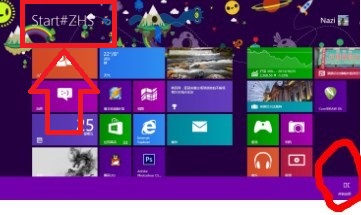
Win8.1 開始畫面顯示「Start#ZHS」?字體檔損毀導致,複製正常字體庫覆蓋即可修復

編輯:Win8 系統基礎知識

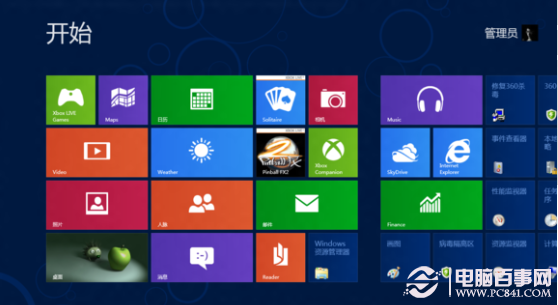
升級 Windows 8.1 後,開始畫面左下角原本應顯示「開始」或「 Start」,卻出現「Start#ZHS」亂碼。經查證,主因使用者曾手動修改或替換系統字體檔(如微軟正黑體),導致 UI 字體回落失敗。

解決方法

  1. 從另一台正常的 Windows 8/8.1 電腦複製完整字體資料夾 C:\Windows\Fonts(或下載可信任的 Win8.1 字體庫壓縮包)。
  2. 以系統管理員身分開啟命令提示字元,執行 takeown /f C:\Windows\Fonts /r 取得擁有權,再 icacls C:\Windows\Fonts /grant administrators:F /t 授權。
  3. 將正常字體檔案覆蓋貼上至 C:\Windows\Fonts,略過重複檔案提示。
  4. 重新開機,開始畫面即恢復正常顯示「開始」。

補充說明

  • 若找不到參考電腦,可搜尋「Win8.1 字體庫 下載」取得,但請確認來源可靠,避免植入惡意字體。
  • 同理適用於 Windows 8 相同症狀。
  • 建議日後修改字體改用「控制台」→「外觀與個人化」→「字體」→「字體設定」中的「讓我為每種語言選擇字體」功能,而非直接覆蓋系統檔案。
Copyright © Windows教程網 All Rights Reserved