Windows XP Windows 7 Windows 2003 Windows Vista Windows 綜合教學 Linux 系統教學
Windows 10 Windows 8 Windows 2008 Windows NT Windows Server 電腦軟體教學

Windows 8 無法開啟網頁?網路連線測試、DNS 設定與 Winsock 重置完整排除教學

編輯:Win8 系統基礎知識

Windows 8 瀏覽器打不開網頁時,原因可能涉及網路連線、DNS 設定、系統網路堆疊錯誤。本文提供完整排除步驟:Ping 測試、DNS 檢查、Winsock 重置。

1. 確認網路連線

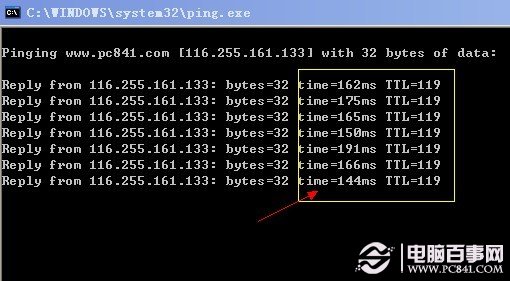
Win + R → ping www.pc841.com -t(或知名入口網站)
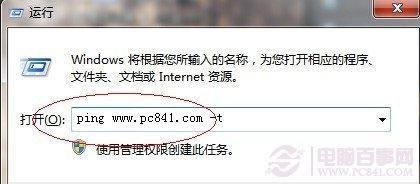

Ping 指令測試
  • 顯示 Time=xxms 代表連線正常,數值越小越好。
  • Time 超過 1000ms 或顯示「Request timed out」表示網路不穩/斷線。
  • 全英文錯誤訊息代表完全無法連線。

Ping 正常範例

2. QQ 能上但網頁打不開

通常為 DNS 設定錯誤或網速過慢。建議 DNS 設為「自動取得」,或手動指定公開 DNS(如 Google 8.8.8.8、114.114.114.114)。

3. 系統層面問題

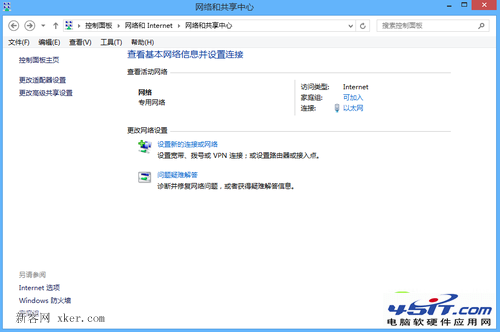
  • Metro IE 無法開啟網頁:嘗試在「網路與共用中心」 → 「變更介面卡設定」 → 右鍵介面卡 → 「診斷」。
  • 重置 Winsock 目錄:
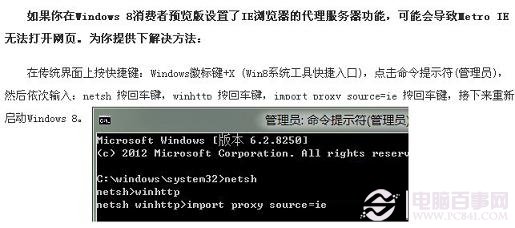
    Win + X → 「命令提示字元 (系統管理員)」 → netsh winsock reset → 重開機。

Metro IE 修復示意

以上步驟可解決多數 Windows 8 無法開啟網頁的情況。

Copyright © Windows教程網 All Rights Reserved