Windows XP Windows 7 Windows 2003 Windows Vista Windows 綜合教學 Linux 系統教學
Windows 10 Windows 8 Windows 2008 Windows NT Windows Server 電腦軟體教學

Win8 升級 Win10 報錯 0x800703f1 解決法:重設 Windows Update 元件

編輯:Win8 系統基礎知識

Win8 升級 Win10 遭遇錯誤代碼 0x800703f1,通常是 Windows Update 元件異常。透過 CMD 重設相關服務與暫存資料夾即可修復。
修復步驟

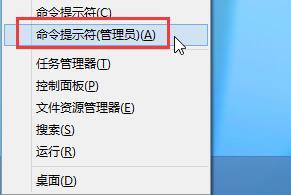
  1. 右鍵開始按鈕 (或 Win+X) → 選「命令提示字元 (系統管理員)」。
  2. 開啟管理員命令提示字元
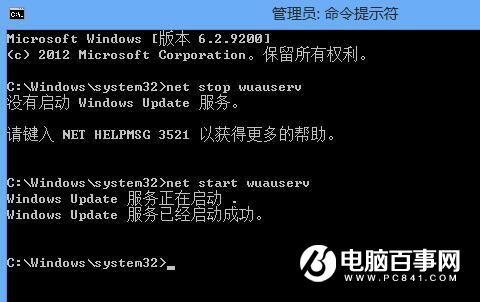
  3. 輸入 net stop wuauserv 停用 Windows Update 服務,按 Enter。
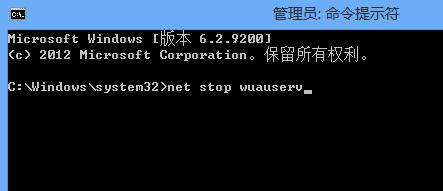
  4. 停用 wuauserv 服務
  5. 開啟檔案總管進入 C:\Windows\SoftwareDistribution,將 SoftwareDistribution 資料夾重新命名為 SoftwareDistributionOld。
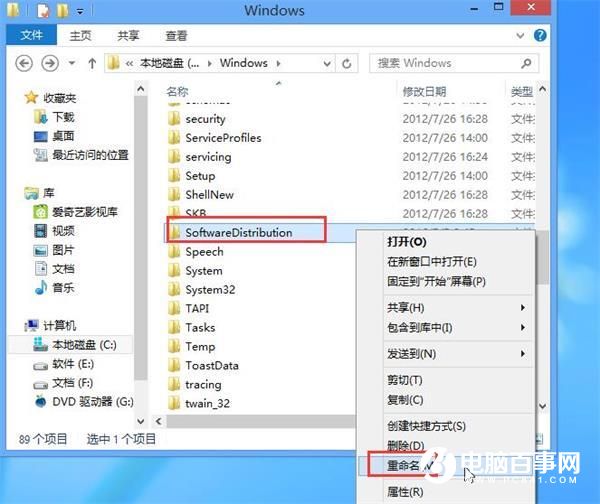
  6. 重新命名 SoftwareDistribution 資料夾
  7. 回到 CMD 輸入 net start wuauserv 重新啟動服務,按 Enter。
  8. 重新啟動 wuauserv 服務
  9. 重開機後再次嘗試升級 Win10。

此法能清除損壞的更新快取,解決多數 0x800703f1、0x80070002 等更新錯誤。

Copyright © Windows教程網 All Rights Reserved