Windows XP Windows 7 Windows 2003 Windows Vista Windows 綜合教學 Linux 系統教學
Windows 10 Windows 8 Windows 2008 Windows NT Windows Server 電腦軟體教學

免費領取 Windows 8 Media Center 密鑰:僅限 Pro 版、2013/1/31 前啟用

編輯:Win8 系統基礎知識

Windows 8 及 Windows 8 Pro 均未內建 Windows Media Center(WMC)。為回饋用戶,微軟針對 Windows 8 Pro 使用者 限時免費提供 Windows Media Center 功能包,可啟用直播電視觀看與錄製功能。
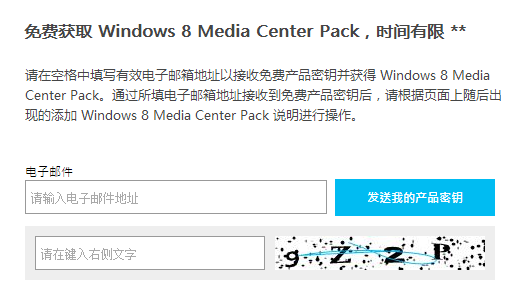
領取條件與期限

  • 適用對象:僅限 Windows 8 Pro 使用者(Core 版、Enterprise 版、RT 版不適用)
  • 活動期間:2012/10/26 ~ 2013/01/31
  • 每信箱限領:1 組產品金鑰
  • 金鑰啟用期限:必須在 2013/01/31 前啟用
  • 官方領取頁: windows.microsoft.com/zh-CN/Windows-8/feature-packs

安裝啟用步驟

  1. Charms 列 → 搜尋 → 輸入「新增功能」 → 選擇「設定」
  2. 點擊「向 Windows 8 新增功能」
  3. 選擇「我已有產品金鑰」
  4. 輸入領取的金鑰 → 下一步
  5. 閱讀授權條款 → 勾選同意 → 「新增功能」
  6. 系統自動重啟,完成後即可使用 Windows Media Center

新增功能精靈:輸入 Media Center Pack 金鑰

提醒:此優惠已於 2013 年 1 月 31 日結束。若為現有 Win8 Pro 使用者且未領取,目前已無法透過官方管道免費取得。Media Center 功能包後續改為付費購買。

Copyright © Windows教程網 All Rights Reserved