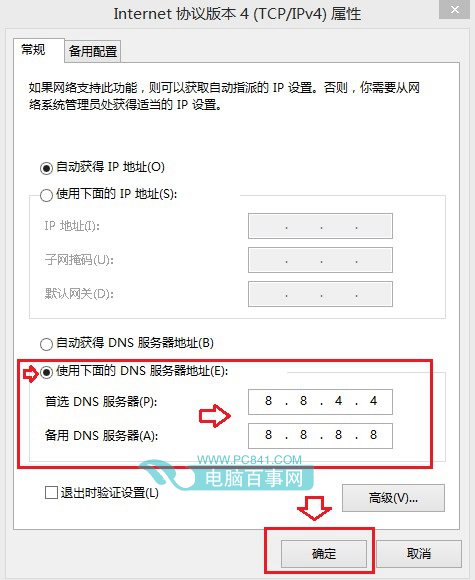
Win8.1 應用商店常因伺服器在國外導致無法連線(網路正常但商店打不開)。兩大解決方案:
完成後商店通常可連線。使用完畢建議改回「自動取得 DNS」以提升國內瀏覽速度。
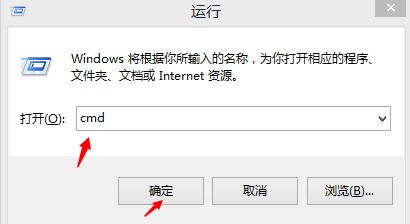
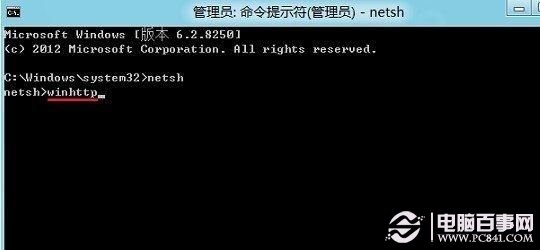
cmd
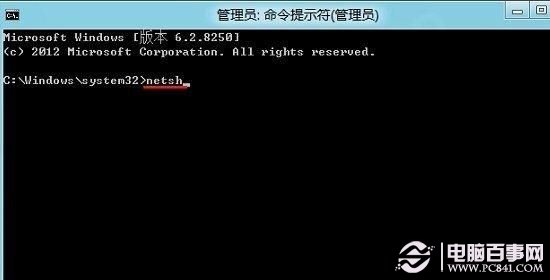
netsh
winhttp
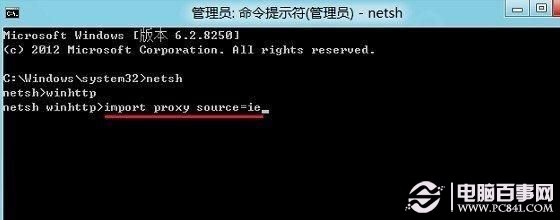
import proxy source=ie
若仍無效,檢查防火牆/安全軟體攔截,或更新網卡驅動。
Windows 8 相片應用顯示電腦圖片:建立圖片庫包含資料夾、SkyDrive 雲端同步、外接裝置匯入
Windows 8 印表機問題完整排除:硬體檢查、疑難排解、驅動更新三步驟
Windows 8 個人化圖片設定:鎖定畫面、圖片密碼、開始畫面配色、帳號頭像、主題
Windows 8 調整螢幕解析度:桌面右鍵兩步搞定
Win8 離線安裝 .NET Framework 3.5:用 DISM 指令掛載安裝媒體來源,免聯網等待
Windows 8 休眠選項消失?群組原則啟用「在電源選項中顯示休眠」+ powercfg 停用滑鼠喚醒徹底修復
Metro 版 Firefox 開發中:介面截圖曝光,第二季無望釋出,ARM 版同步規劃
Windows 8 系統復原雙引擎:重置與重新整理的運作流程與資料保留差異