指令 shutdown.exe /s /hybrid /t 0 結合快速啟動技術,實現近乎瞬間關機。適用 Win8/Win7/Win10/Win11。
shutdown.exe /s /hybrid /t 0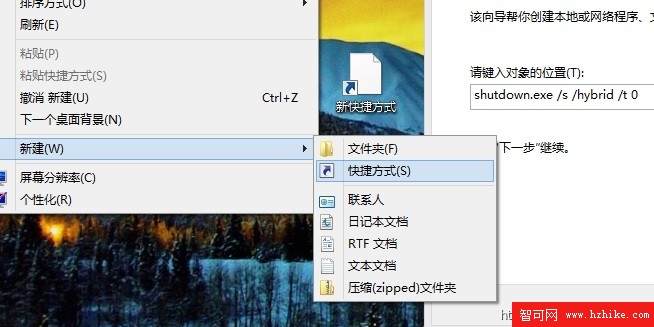
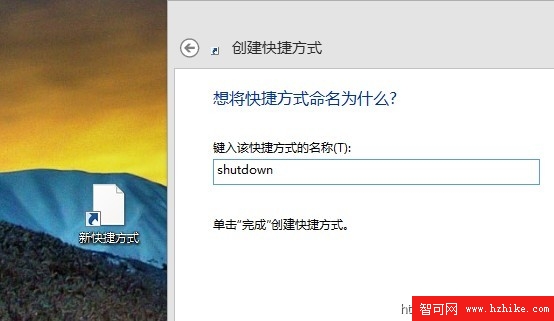
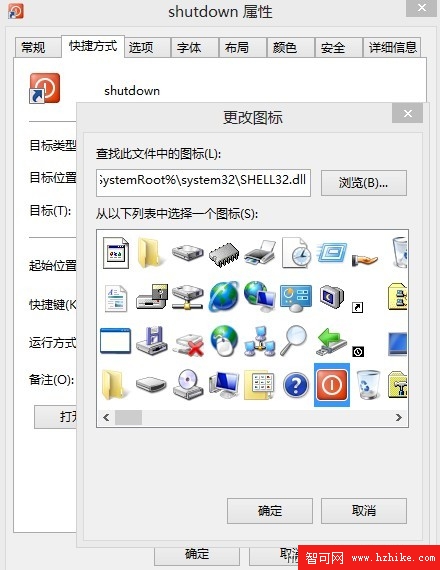
點擊即關機,無確認對話框。誤觸將導致資料遺失,請謹慎放置。平時建議使用「睡眠」模式替代關機,兼顧速度與資料安全。
Windows 8 新手入門指南:鎖定畫面、Metro 開始畫面、磚操作、觸控手勢、Charms 列、關機方式完整圖文教學
Windows 8.1 Update RTM Escrow 實測體驗報告:開始畫面、Modern 應用、設定、DPI 縮放七大細節深度解析
Windows 8 滑鼠右鍵選單新增關機、重開機、登出等電源選單:登錄檔一鍵部署
Windows 8 入門必學 18 大操作技巧:手勢、多工、搜尋、同步帳號全攻略
Windows 8 快速移除 Modern 應用:右鍵一鍵解除安裝
Windows 8 CP 硬碟安裝教程截圖(二):命令列啟動安裝與授權接受