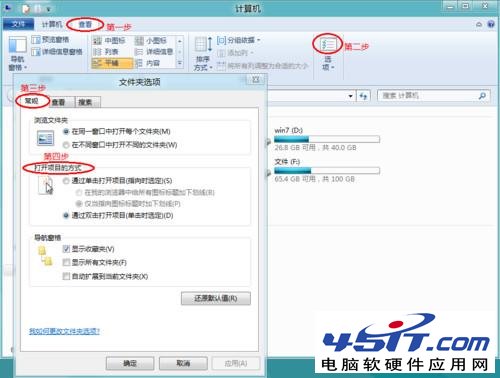
Windows 8 設定單/雙點擊開啟方式與 Windows 7 類似,僅控制台路徑不同。
習慣單點擊開啟的使用者,依此設定即可恢復 Windows 98/XP 時代操作習慣。
Windows 8 如何查看系統啟用日期與授權狀態?
Windows 8 使用技巧大全:50 招實用操作秘籍(一)
Win8 計算機在哪裡?開始畫面「所有應用程式」→「Windows 配件」→「計算機」
Windows 8 系統 ADSL 空閒自動斷線解決方案
Windows 8 快速鍵大全:提升操作效率的完整指南
Windows 8 資源管理器更名為「檔案總管」:Build 843x 版本細節變化
Windows 8 隱藏功能大公開:20 個提升效率的個性化小技巧
Windows 8 登錄修改恢復經典開始選單:RPEnabled=0 禁用 Metro 介面教學