除了 Ribbon 界面與藍色箭頭,Windows 8 檔案總管的「組織」選單也大幅改進:幾乎每個命令前都加上了圖標。
圖 1:Windows 8 組織選單
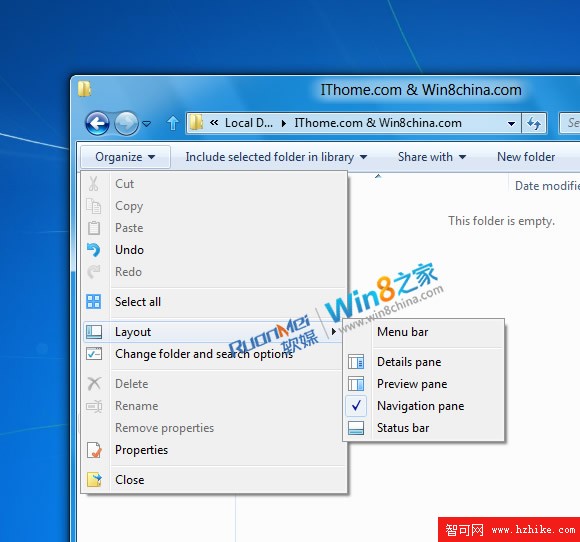
圖 2:Windows 7 組織選單
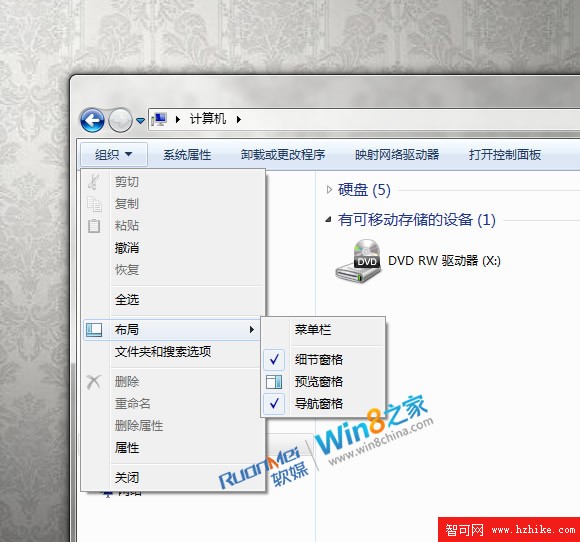
對比可見:關閉、屬性、重命名、全選、撤銷等命令左側均新增圖標,僅「刪除屬性」無圖標。此外,「配置」子選單新增「狀態列」項目,可直接切換狀態列顯示/隱藏。
4 天后 BUILD 大會即將開幕,更多細節將揭曉。
Windows 8 在 Legacy BIOS 與 UEFI 模式下安裝完整指南
Windows 8 無法使用建行網銀盾完美解決方案 (續):批次檔自動化修復
Windows 8 建立虛擬 Wi-Fi 熱點共享上網:netsh 指令完整教學 (支援 ad-hoc、SSID/密碼自訂、ICS 共享)
安裝 QQ 後必刪的三個高 CPU 佔用檔案:QQExternal.exe、TXPlatform.exe、TXPFProxy.dll
U 盤安裝 Win8.1 完整圖文教學:從製作啟動碟到進桌面全過程
Win8.1 開始畫面個人化完整指南:背景同步、磁貼尺寸、分組命名、批次操作