Windows XP Windows 7 Windows 2003 Windows Vista Windows 綜合教學 Linux 系統教學
Windows 10 Windows 8 Windows 2008 Windows NT Windows Server 電腦軟體教學

手動為 Metro IE10 加入 Flash 白名單:微軟中國官方教學

編輯:Win8 系統基礎知識

微軟宣佈 Win8/RT IE10 預設啟用 Flash,但僅限相容性檢視清單內網站。微軟中國分享手動編輯本機 XML 白名單方法,讓指定網站獲得 Flash 支援。

操作流程

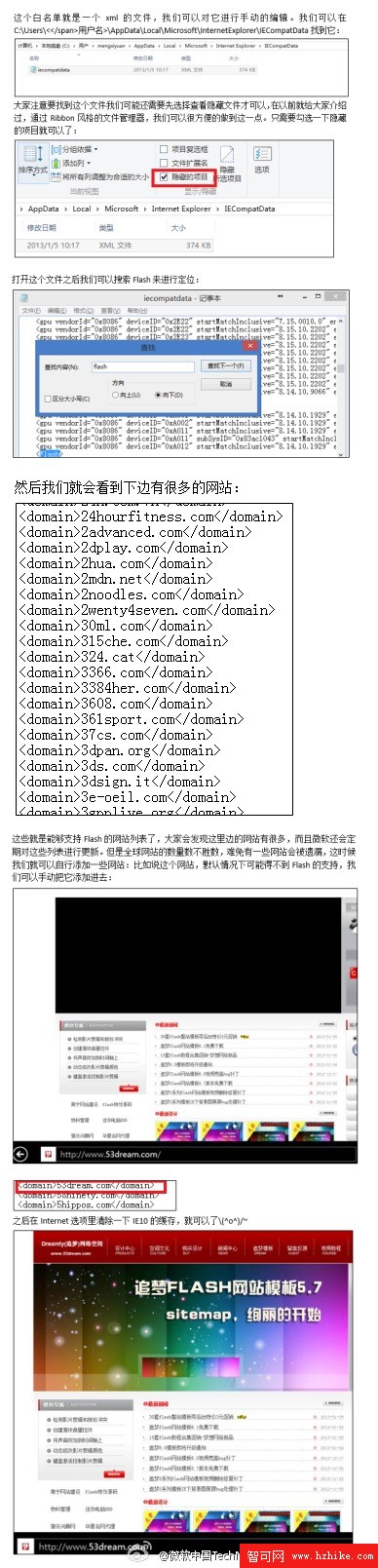
  1. 開啟 C:\Users\使用者名稱\AppData\Local\Microsoft\Internet Explorer\IECompatData\(需顯示隱藏檔案)。
  2. 以記事本開啟 IEcompatdata.XML,搜尋 Flash 定位白名單區塊。
  3. 於現有 <domain> 列表下新增欲支援的網域,格式同現有項目。
  4. 儲存後,IE「網際網路選項」→「刪除瀏覽歷程記錄」清除快取。

IECompatData XML Flash 白名單

此法與前述「破解 Metro IE10 Flash 白名單」同源,為微軟中國官方釋出教學。建議搭配停用「從 Microsoft 下載更新的相容性清單」防止手動新增項目被覆寫。

Copyright © Windows教程網 All Rights Reserved