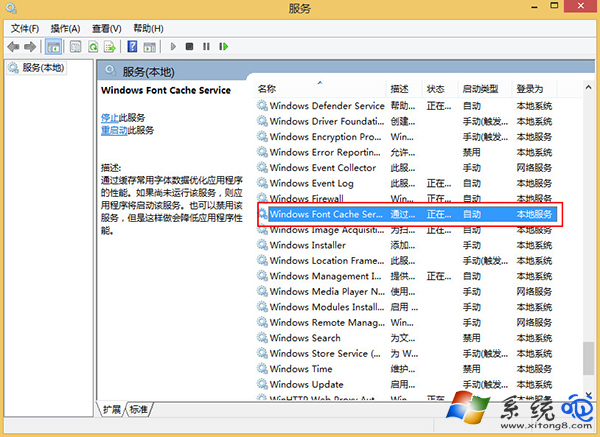
Win8 開機後長時間黑屏、滑鼠游標可動但桌面遲遲不出現,常因 Windows Font Cache Service (Windows 字型快取服務) 設為手動啟動,導致字型快取建立延遲。設為自動啟動即可解決。
services.msc 開啟服務管理員。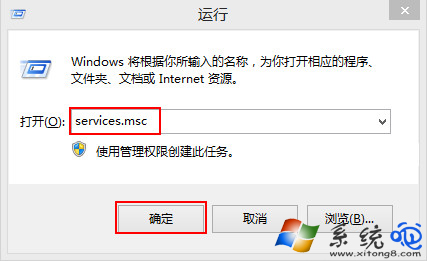
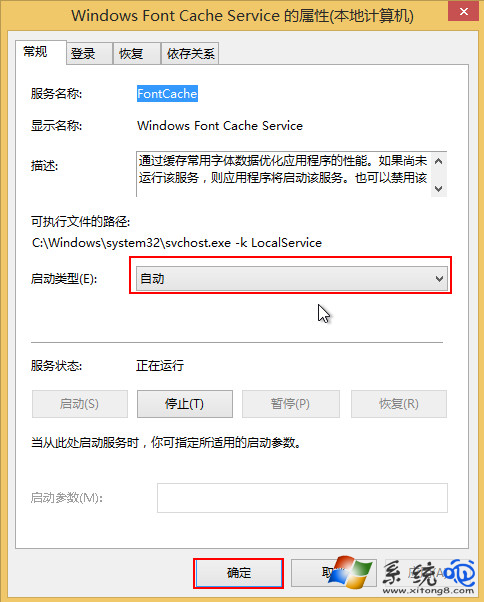
C:\Windows\ServiceProfiles\LocalService\AppData\Local\FontCache\*.dat 重開機重建。Windows 8 如何查看 Metro 應用程式大小與安裝位置完整教學
Windows 8 消費者預覽版全新熱鍵大全:22 組 Win 鍵組合大幅提升操作效率
Win8 離線安裝 .NET Framework 3.5 完整教學:無需網路也能裝
Windows 8.1 進入安全模式最快方法(msconfig 法)
Win8.1 遇上錯誤 651?將 Remote Access Auto Connection Manager 改為自動啟動即可解決
Win8 休眠後快速恢復的關鍵:Modern 應用暫停與記憶體回收機制
Win8 關閉「更新至 Windows 8.1」通知:群組原則與登錄檔雙法
AMD 釋出 Windows 8 首款官方顯卡驅動:Catalyst 8.88.5.0004,支援 HD 5000/6000 系列