Windows XP Windows 7 Windows 2003 Windows Vista Windows 綜合教學 Linux 系統教學
Windows 10 Windows 8 Windows 2008 Windows NT Windows Server 電腦軟體教學

Win8.1 系統無法自動載入 Flash 外掛程式 完整解決方案

編輯:Windows 8 系統介紹

Windows 8.1 內建的 Internet Explorer 通常會自動載入 Adobe Flash Player 外掛,但因系統更新、註冊表損壞或權限問題,導致 Flash 無法自動加載,網頁視頻、動畫無法播放。通過命令提示字元重新註冊 Flash.ocx 即可恢復正常。
Flash 無法載入錯誤示意

操作步驟

  1. 按 Win+R 開啟「執行」,輸入 cmd 並按 Ctrl+Shift+Enter 以系統管理員身分開啟命令提示字元。
  2. 依序輸入以下指令(每行結尾按 Enter):
    cd C:\Windows\System32\Macromed\Flash
    regsvr32 Flash.ocx
    cd C:\Windows\SysWOW64\Macromed\Flash
    regsvr32 Flash.ocx
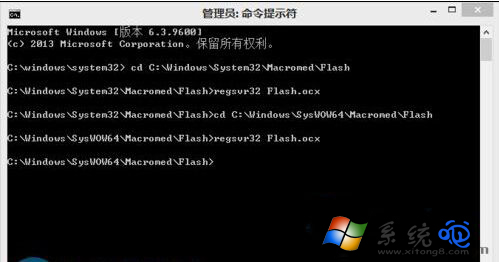
  3. 若彈出「DllRegisterServer 在 Flash.ocx 成功」對話框,表示註冊完成。重新啟動 IE 瀏覽器,Flash 內容即可正常載入。

Flash.ocx 註冊成功提示

補充提示:Adobe 已於 2020 年底停止支援 Flash Player,現代瀏覽器均已移除 Flash 支援。若您仍需運行舊版 Flash 內容,建議使用支援 Flash 的獨立播放器或虛擬機環境,並注意安全風險。

Copyright © Windows教程網 All Rights Reserved