智慧型裝置普及了滑動解鎖,Windows 8 其實內建了同樣酷炫的「滑動關機」功能,只是預設隱藏。若您使用觸控螢幕筆電或平板,啟用它能帶來極佳體驗。以下提供兩種啟用方式:
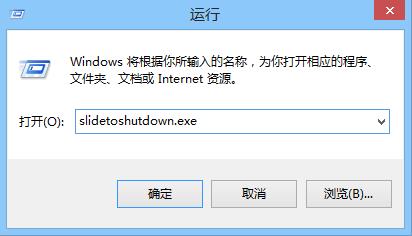
按 Win+R 輸入 slidetoshutdown.exe 按 Enter,螢幕將出現滑動介面,向下拖動即可關機。
slidetoshutdown.exe
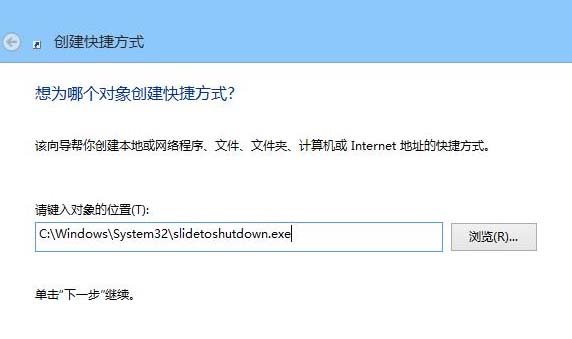
C:\Windows\System32\slidetoshutdown.exe
以後關機只需雙擊捷徑,滑動即完成,比傳統選單快捷許多。
用戶吐槽 Metro 介面混亂 微軟承諾 Beta 版將大幅優化
Win8 系統卡頓怎麼辦?調整虛擬記憶體釋放實體記憶體壓力
Windows 8 Release Preview 官方下載連結洩露,預計北京時間 6 月 1 日凌晨開放
Windows 8 使用網路攝影機拍攝系統帳號頭像
調查顯示用戶對 Windows 8 平板價格期待不高:近四成期待 200-399 美元
Windows 8.1 網路受限/無法連線四大修復方案
Windows 8 VirtualBox 安裝路徑錯誤與 VDI 轉 VHD 完整解決方案
Windows 8.1 Xbox Music 使用技巧:專輯/歌曲全選刪除、清除音樂資料庫區別