Windows XP Windows 7 Windows 2003 Windows Vista Windows 綜合教學 Linux 系統教學
Windows 10 Windows 8 Windows 2008 Windows NT Windows Server 電腦軟體教學

Win8 關閉 UEFI 啟動改 Legacy 安裝 Win7:BIOS 設定 CSM 啟用、關閉 Secure Boot、調整啟動順序

編輯:Windows 8 系統介紹

預裝 Win8 電腦欲改裝 Win7,必須在 BIOS 關閉 UEFI 模式改為 Legacy (CSM) 啟動。操作:進 BIOS → Boot → Launch CSM → Enabled → Security → Secure Boot → Disabled → Startup → UEFI/Legacy Boot → Legacy Only → Boot Priority 將 USB HDD 移至第一順位 → F10 儲存重啟。隨後用 Diskpart clean + convert mbr 將 GPT 磁碟轉 MBR 才能安裝 Win7。

關鍵 BIOS 設定

  1. 開機連按 F2/Del 進 BIOS。
  2. Security → Secure Boot → Disabled (關鍵,否則無法改 Legacy)。
  3. Startup → UEFI/Legacy Boot → Legacy Only。
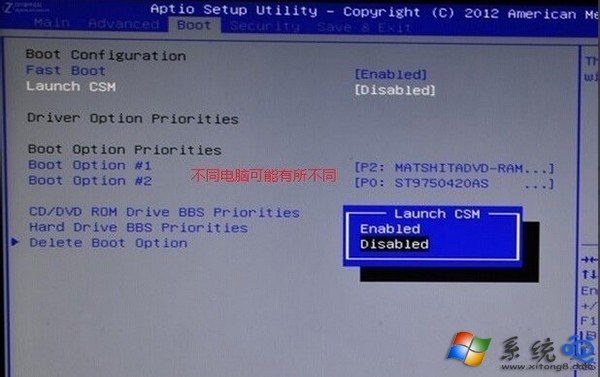
  4. Boot → Launch CSM → Enabled。
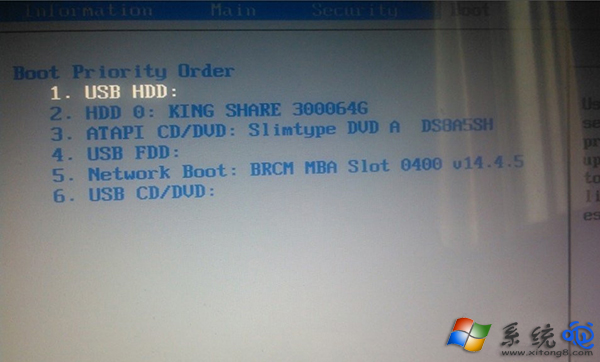
  5. Boot Priority → USB HDD 設為第一啟動項。
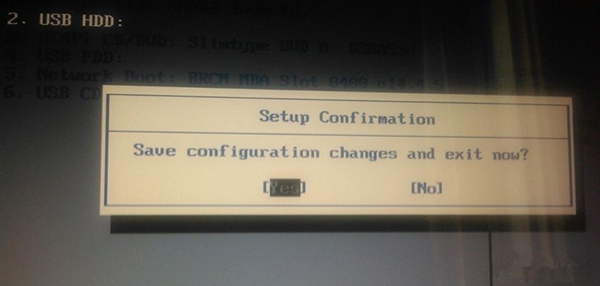
  6. F10 Save & Exit。

安裝 Win7 時磁碟轉換

  1. 安裝介面選磁碟時按 Shift+F10 開啟 CMD。
  2. diskpart → list disk → select disk 0 → clean → convert mbr → exit。
  3. 重新整理磁碟清單,即可正常分區安裝。

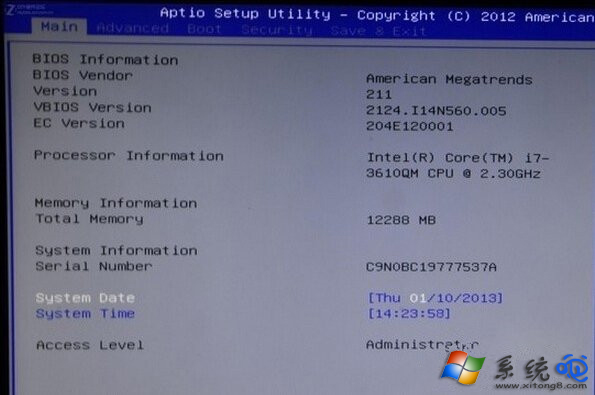
BIOS 主畫面

Launch CSM

啟動順序

儲存離開

警告:操作前請完整備份重要資料,clean 會清空整顆硬碟。預裝 Win8 機型不建議嘗試雙系統,UEFI/GPT 與 Legacy/MBR 混用極易導致開機損壞。

Copyright © Windows教程網 All Rights Reserved