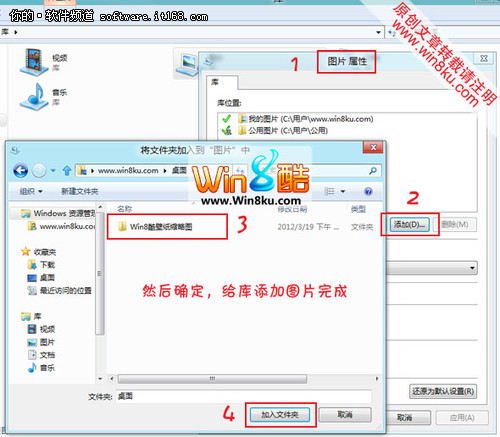
Metro 介面「相片」應用的「圖片庫」預設可能顯示「沒有圖片」。以下 5 步驟教您加入自訂資料夾:
在圖片庫中選取照片 → 右鍵/應用程式列 → 「移除」即可從圖片庫移除(不會刪除原始檔案)。
Windows 8 安裝 Arduino 驅動程式解決「驅動程式簽名」問題
Win8 應用程式商店連不上?修改 DNS 解決下載伺服器連線問題
取得微軟官方 Windows 8.1 ISO 並製作安裝媒體:升級助手離線下載法
Win8 輕鬆掃描硬體變更:裝置管理員三種操作入口
Windows 8 讓 Intel 顯示卡圖示重新出現在系統匣區
深度探索 Win8.1 Update 新改進:傳統 PC 體驗大幅升級
Win8.1 安裝應用程式出現 0x80004005 錯誤?註冊 DLL 檔案修復
Windows 8 Metro 介面誤刪控制台圖標快速找回教學