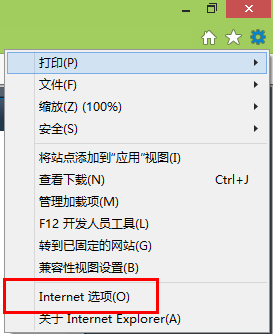
Win8 設定自動設定腳本(PAC 檔)步驟:
四步驟完成,介面與舊版 Windows 一致。附操作截圖 4 張。
Win8/8.1 關閉惱人的程式相容性助手提示
微軟將大幅改進 Windows 8 語音控制:Tellme 技術整合、雲端語音平台
Win8 家長控制設定教學:監控孩童電腦使用時間與應用
Windows 8 系統設定工具 (msconfig) 完整介面導覽:啟動、服務、引導、工具
Win8.1 將公用網路改為專用網路,獨享專屬連線環境
Windows 8 設定自動播放:插入媒體/裝置時的自動動作自訂指南
Win 8.1 無法玩 LOL?升級補丁與替換檔案解決相容問題
購買 Windows 8 平板電腦 10 大理由:Pro 完整功能、Surface 標桿、企業級、相容性、選擇權、定價、微軟決心、反蘋果選項