Windows 8 早期相容防毒軟體僅 5 款,RP 版擴增至 27 款通過測試、190 款不相容。微軟提供官方線上相容性中心查詢最新支援清單。
查詢步驟
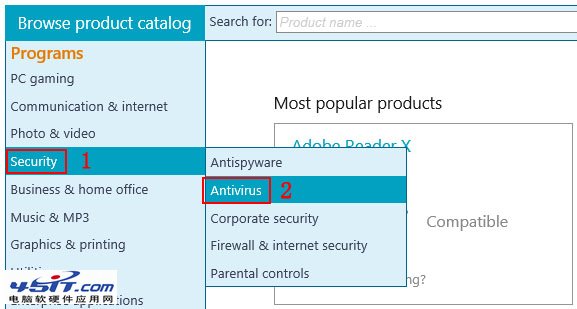
- 瀏覽 微軟相容性中心。
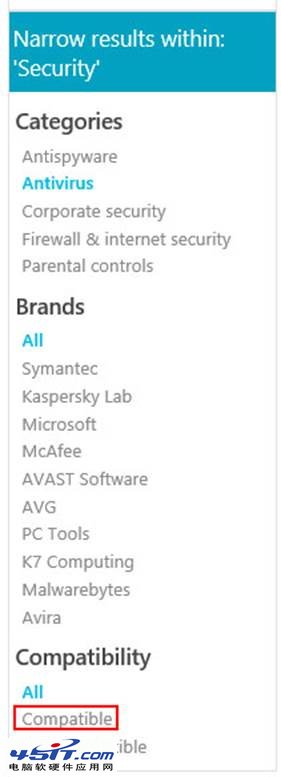
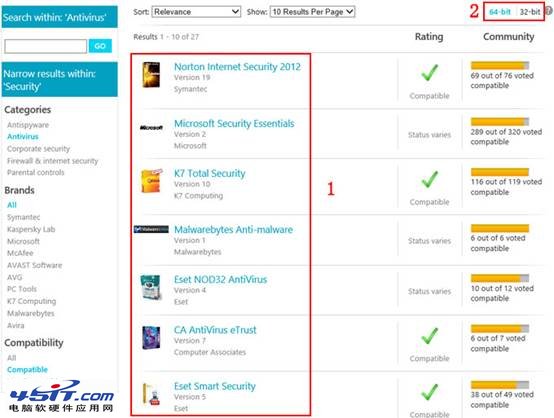
- 左側選單展開「Security」→ 點選「Antivirus」。
- 底部點選「Compatible」篩選通過測試的產品。
- 右上角可切換「64-bit」/「32-bit」確認架構相容性。
早期通過測試產品(參考)
- BullGuard Internet Security
- F-Secure Internet Security Technical Preview
- McAfee Total Protection 5.6 Beta
- Norton 360 6.0 Beta
- Trend Micro Titanium 5
重要機制
- Win8 內建 Windows Defender (MSE 核心) 預設啟用。
- 安裝第三方防毒軟體後,系統自動停用 Defender,無需手動操作。
- 國產防毒軟體正式版釋出前,建議暫用 Defender 或相容清單產品。