Windows XP Windows 7 Windows 2003 Windows Vista Windows 綜合教學 Linux 系統教學
Windows 10 Windows 8 Windows 2008 Windows NT Windows Server 電腦軟體教學

Win8 版本大比拚:標準版 vs 專業版 vs 企業版 vs RT 功能差異一次看懂

編輯:Windows 8 系統介紹

Windows 8 推出四大版本,針對不同對象設計。本文整理核心功能差異,助你精準選擇。

版本定位速查

版本目標用戶核心特色
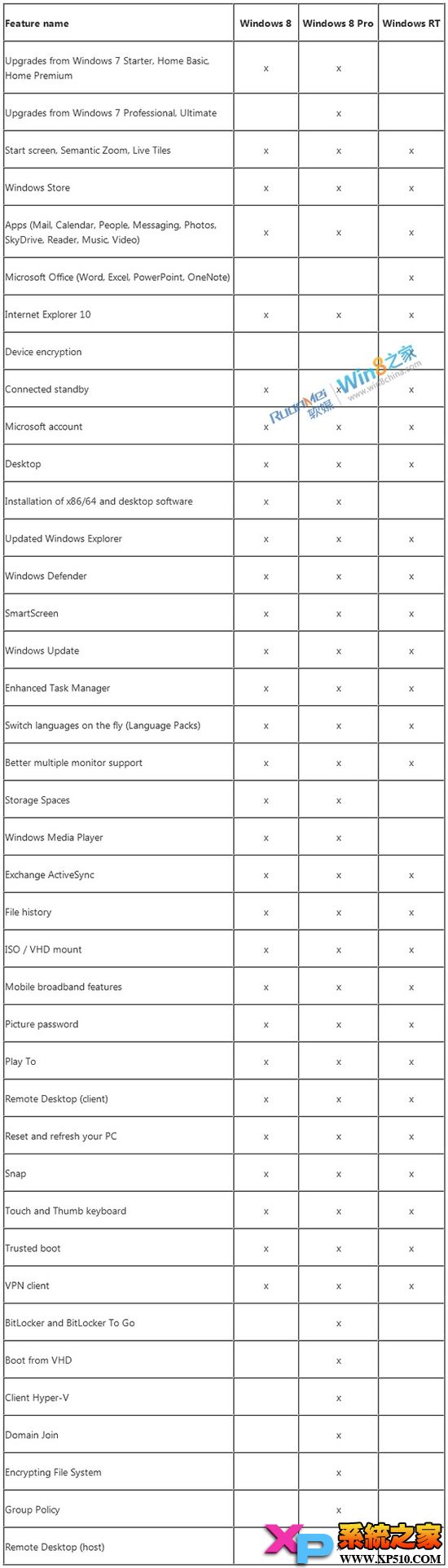
Windows 8 (標準版/核心版)一般家庭用戶完整 Modern 體驗:應用商店、新版檔案總管、工作管理器、IE10、多國語言包
Windows 8 Pro高階用戶/技術人員/中小企業含標準版所有功能 + BitLocker、加密檔案系統 (EFS)、Client Hyper-V、網域加入、群組原則、遠端桌面主機
Windows 8 Enterprise大型企業(批量授權)含 Pro 所有功能 + Windows To Go、DirectAccess、BranchCache、AppLocker、VDI 增強 (RemoteFX/觸控)、Modern 應用並存部署
Windows RTARM 平板裝置(預裝)僅執行 Modern 應用,內建 Office 2013 RT (Word/Excel/PPT/OneNote),不支援傳統桌面軟體安裝,不單獨零售

關鍵差異補充

  • 旗艦版不存在: Win8 取消旗艦版,Pro 相當於舊版旗艦定位。
  • Media Center: Pro 可另購 Media Center Pack 獲得;Enterprise 需額外授權。
  • 升級路徑: Win7 專業版/企業版/旗艦版可原地升級至 Win8 Pro/Enterprise;Home Premium 僅能升級至 Win8 標準版。
  • 試用: Enterprise 提供 90 天評估版下載。

功能對照表(官方圖示)

選購建議

  • 家庭一般用戶 → 標準版 即足夠。
  • 需 BitLocker、Hyper-V、遠端桌面、加入網域 → Pro。
  • 企業大量部署、需 Windows To Go/DirectAccess/AppLocker → Enterprise(批量授權管道)。
  • 購買 ARM 平板(Surface RT 等) → RT(預裝,不可自行安裝)。
Copyright © Windows教程網 All Rights Reserved