Win8 環境下直接安裝 Office 2010 常會報錯,主因是缺少相容性更新。只需透過 Windows Update 安裝特定修補程式即可順利完成安裝。
解決步驟
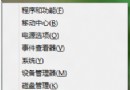
- 按 Win+X →「控制台」→「系統及安全性」→「Windows Update」→「安裝選用更新」。
- 在重要更新清單中尋找 KB2680376,勾選安裝。
- 安裝完成並重新開機後,即可正常安裝 32 位元或 64 位元 Office 2010,不再出現相容性錯誤。
此更新修正了 Win8 下 Office 2010 安裝程式的相容性問題,是解決該問題的標準方案。