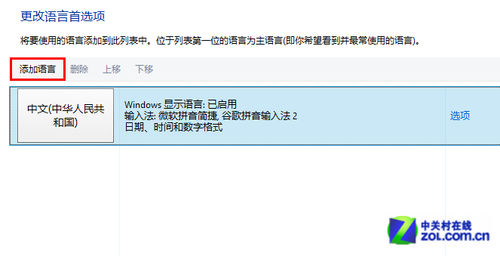
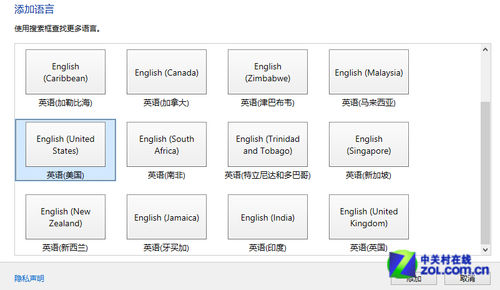
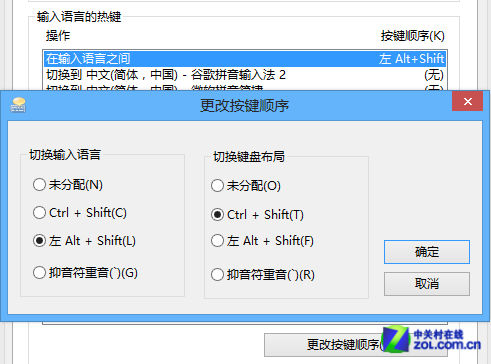
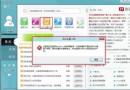
習慣美式鍵盤佈局的用戶可在 Win8 中恢復:控制台 → 時鐘、語言和區域 → 新增語言 → 選擇「英語」→「英語 (美國)」→ 新增 → 進階設定 →「替代預設輸入法」選「美式鍵盤」→ 若要改熱鍵:進階設定 →「變更語言列熱鍵」→ 選美式鍵盤 → 變更按鍵序列為 Ctrl+Shift。注意:Metro 介面仍需使用「微軟簡捷」輸入中文。
Win8 檔案總管功能區快速鍵操作技巧
Win8.1 開機直進桌面新選項全解析:任務列屬性「導航」分頁詳細說明
Windows 8 關閉「動作中心」提示訊息,打造無干擾環境
找回 Windows 8.1 體驗指數:ChrisPC Win Experience Index 小工具一鍵評分
Windows 8 13 大必看特色功能:快速啟動、重置刷新、Windows To Go、Store、Ribbon、Wi-Fi Direct、NFC、ISO 掛載、分屏、ARM、SkyDrive、Hyper-V、新任務管理員
Windows 8 無聲音、解析度異常?透過裝置管理員自動更新驅動程式最穩妥
2013 Windows 8 檔案歷程記錄使用教學:開啟備份、還原檔案、總管還原版本
Win8 關閉 BitLocker USB 加密:控制台 BitLocker 磁碟機加密解密移除保護