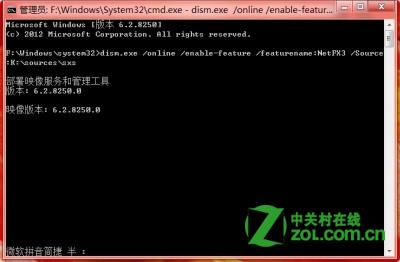
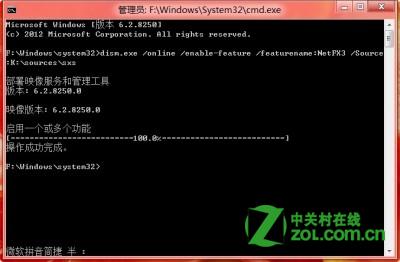
Windows 8 內建 .NET 4.5,但許多舊軟體需 .NET 3.5。Windows Update 線上安裝常失敗,實則安裝媒體 sources\sxs 目錄已含離線安裝檔。以系統管理員身分執行命令提示字元,執行 dism.exe /online /enable-feature /featurename:NetFX3 /Source:H:\sources\sxs (H 為虛擬光碟代號) 即可快速離線安裝成功。
sources\sxs
dism.exe /online /enable-feature /featurename:NetFX3 /Source:H:\sources\sxs
Windows 8 截圖自動儲存至桌面:登錄修改 ScreenshotIndex 改變預設路徑
Win8 向「視訊」程式庫新增影片資料夾教學
Windows 8 全球市佔率達 0.13% (消費者預覽版數據)
Windows 8 图片密码设置全攻略:三步手势替代繁琐字符,安全又便捷
Win8 行動寬頻裝置解鎖與解除封鎖:PIN 輸入與 PUK 碼操作指南
Win8 桌面捷徑左下角出現黑方塊?騰訊電腦管家一鍵修復
Win8 C 槽空間不足怎麼辦?動態磁碟擴充實戰紀錄
Win 8 登入 QQ 後取消自動啟動 QQ 寵物 設定介面關閉選項